

Cold emailing is one of the most effective ways to generate leads, but it's also time-consuming AF. The right cold email templates will save you time, get more replies, and generate more leads.
Over the past 20+ years, I’ve sent thousands of cold emails and helped other teams and businesses do the same. These templates are my best of the best, crafted and approved by real salespeople. They’ve established high-value prospect relationships and landed big new deals, but more than anything, they start conversations.
There's just one small caveat to using these templates—you can't copy, paste, hit "send," and expect a flood of new business from potential customers. The best cold email templates are those that continue to evolve and work for you over time.
Now, let’s dig into 15 of our favorites. 👇
1. The Authentic Referral Cold Email
Subject Line: [Name], can you help?
Hey [first name],
We recently launched a new platform at [your company] that [one-sentence pitch], and we’re already seeing strong results for [be specific] among [your target customers].
Do you handle [the thing your product or service does]? If not, could you point me to the right person?
Thanks,
[Your name]
When to Use This Cold Email Template
If you have a big ask or a high-ticket product to sell, this is a great email to use. A prime example of using this template is when you aren’t sure who your best point of contact would be.
2. Asking for an Introduction Email Template
Subject Line: Can you show me the way?
Hey [first name],
I’m with [company name], and we’ve been working with [customer with a similar profile] to [one-sentence pitch + result].
Could you point me toward the right person on your team to chat with about this?
Cheers,
[Your name]
When to Use This Cold Email Template
This is a quick email to ask for an introduction. The best time to use this cold email template is when you can’t find the perfect point of contact, and you’re pretty sure this person isn’t it.
3. Authority-Building Referral Email
Subject Line: Want [insert metric from case study]?
Hey [first name],
I’ll get straight to the point: we help [target customer] tackle [main pain point], and our [solution / tool / service / product / team] is extremely effective.
We’ve already helped companies like [3–4 relevant customer names] achieve [specific metric or result].
Do you have 15 minutes tomorrow to chat about how you could expect [#1 benefit for your team]?
[Include a link to schedule a call]
Thanks for your time,
[Your name]
When to Use This Cold Email Template
Use this template when building trustis the primary objective. For example, are you trying to sell a premium-priced product or land an enterprise customer with a long sales cycle? Then try this template.
4. Recent Event Cold Outreach Email
Subject Line: Want [insert metric from case study]?
Hey [first name],
I’ll get straight to the point: we help [target customer] tackle [main pain point], and our [solution, tool, service, product, team, etc.] is extremely effective.
We’ve already helped companies like [3–4 current relevant customer names] reach [insert specific metrics].
Do you have 15 minutes tomorrow to chat about [#1 benefit your prospect can expect]?
[Include a link to schedule a call]
Thanks for your time,
[Your name]
When to Use This Cold Email Template
If your lead research uncovers an interesting, relevant event or promotion, use this template. The only caveat here is to be genuine about it.
5. The Quick Question Cold Email Template
Subject Line: Quick question
Hey [first name],
At [company], we’ve helped [number] companies like [recipient company] achieve [quick major benefit—numbers or stats work especially well here].
Could you point me toward the right person on your team to chat about [your biggest pain point that resonates with your ideal customer—or a function like “sales” or “recruiting”]?
Thank you,
[Your name]
When to Use This Cold Email Template
This is a great template to help you get a quick response from time-strapped decision-makers. Also, if you’re getting lower-than-average response rates, you can use this email to make sure you’re getting in touch with the right person.
6. PAS Competitor Mention Template
Subject Line: Scale [their company name] in [time frame]
Hey [first name],
While researching [company name], I came across your profile—it looks like you’ve spent the past [number of years at the company] years helping scale the [department] team.
Does your team ever struggle with [the pain point your solution solves]?
[Recognizable competitor] needed a way to [what you offer]. After leveraging [your company name], they saw [major benefit]. As a result, their customers experienced [business impact].
Would it make sense to explore how we could help your team achieve similar results?
[Your name]
When to Use This Cold Email Template
The PAS framework—problem, agitate, solution—works best with leads in the consideration stage. Why? Learning how their competitors benefited from your solution helps "push" them through your sales funnel.
7. Short and Sweet Sales Pitch Email
Subject Line: Why [your company]?
Hey [first name],
I [explain how you got their contact information—spoke with a colleague, came across your company online, etc.] and wanted to see if you’d be interested in [#1 major benefit of your solution—specific numbers work great here].
At [your company], we’ve built a platform that helps [department] teams at companies like [organization name] [one-sentence pitch of benefits].
Would you be available for a quick call on [time and date] to explore this further?
[Link to calendar]
[Your name]
When to Use This Cold Email Template
Use this template for just about any pitch, to any prospect. It’s versatile—and designed to pack a punch.
It’s just an overall solid B2B cold email template.
8. The AIDA Cold Email Template
Subject Line: Tired of [pain point]?
Hey [first name],
I [explain how you got their contact information—talked to a colleague, came across your company online, etc.] and wanted to see if you’d be interested in [#1 major benefit of your solution—specific numbers work great here].
At [your company], we’ve built a platform that helps [your team] at [organization name] with [one-sentence pitch of benefits]. We do this by:
• [Key capability or approach #1]
• [Key capability or approach #2]
• [Key capability or approach #3]
Would you be available for a quick call on [time and date] to explore this further?
Cheers,
[Your name]
When to Use This Cold Email Template
This AIDA framework template—feat., awareness, interest, desire, and action—is best for leads that strongly match your ideal customer profile. This way, you know their desires and can become hyper-relevant.
9. Manager FWD Cold Email Template
Subject Line: FWD [your company] + [their company]
Hey [first name],
My [executive title—CEO, CFO, etc.] asked me to reach out (see below).
Our company, [your company name], is built specifically for [target audience] to help them [what you do / core outcome].
Our customers see benefits like [briefly list core benefits or value proposition].
Do you have time for a 10-minute call this week or next?
[Calendar link]
Thanks for your time,
[Your name]
When to Use This Cold Email Template
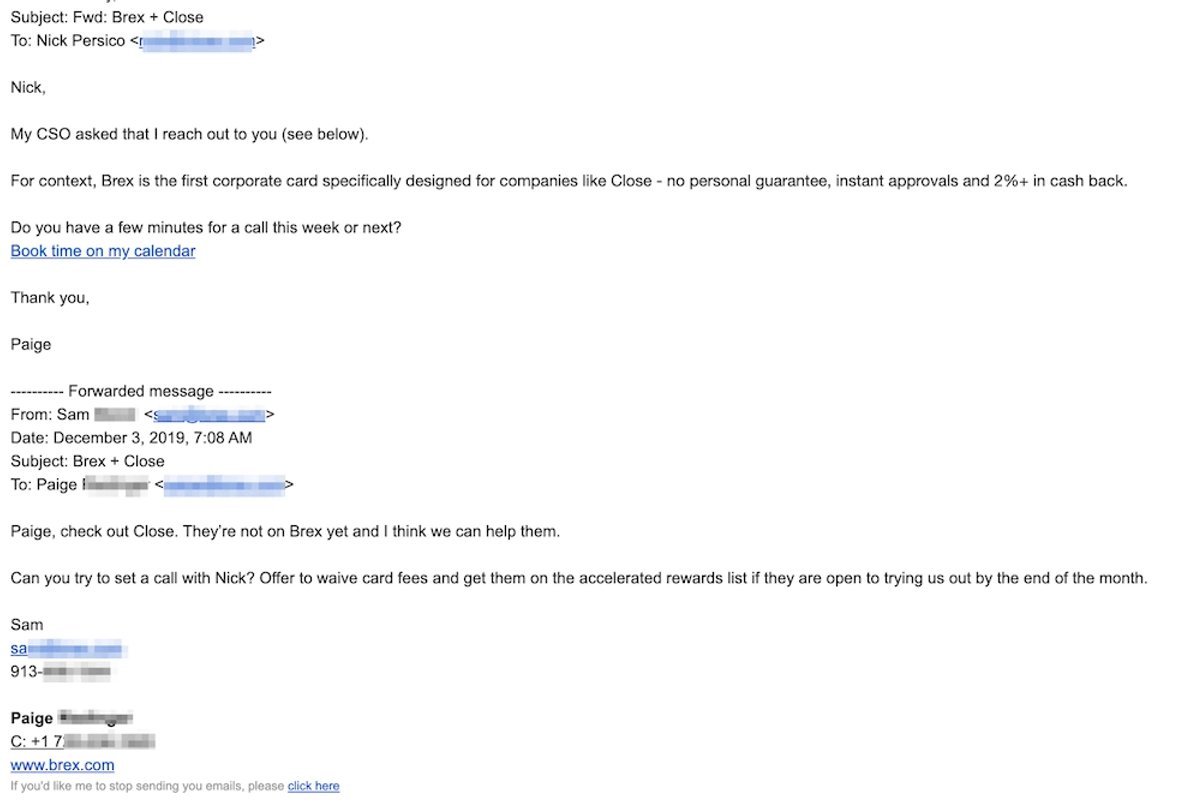
This template should be used sparingly and only with an intimate understanding of your ideal customer and this specific prospect. It includes the FWD message from your CEO asking you to reach out so you don’t want to come across as "gimmicky."
Here’s how Brex used this email on a Close team member (in real life):
10. No-Ask Outreach Email
Subject Line: Your feature on our blog
Hey [first name],
My content team at [your company] recently published a post featuring [recipient company name] in an article about [title of the post — hyperlink to the article].
We’re big fans of what you’re doing in the [industry] space—especially [what the recipient company does uniquely]—and we included you by [how you referenced them: link, quote, mention, etc.].
I’d love to hear your thoughts, or if you have any additional insights to add!
[Your name]
When to Use This Cold Email Template
Use this template when you have a big "ask," but haven’t established a relationship with the prospect yet. It provides value—without asking for more than a response.
11. "My CEO is Excited" Cold Call Email Template
Subject Line: Your feature on our blog
Hey [first name],
My content team over at [your company] recently published a post featuring [recipient company name] in a post about [title of the post].
We’re big fans of what you’re doing in the [industry] space, and we included you by [how you referenced them—link to a blog post, quote, mention, etc.].
I’d love to hear your thoughts, or if you have additional insights to add!
[your name]
When to Use This Cold Email Template
Like the FWD template, use this one sparingly—and primarily with SaaS folks.
12. "Can I Send You Ideas?" Cold Email
Subject Line: Two ideas for [company]
Hey [first name],
I’m with [your company], where we [service you offer] for [target industry]. We’ve worked with companies like [name of 2–3 relevant past customers] to achieve [specific results, figures, etc.].
I noticed [something relevant to your offering—for example: “that your team publishes a lot of content”].
Do you already have a process for [solution you offer]? If not, I’d be happy to send over a quick, no-strings-attached video with two simple ways you can [prospect’s pain point you solve].
What do you think?
[your name]
When to Use This Cold Email Template
This email works particularly well for service-based companies with deep industry expertise, but it can be adapted to most scenarios.
13. The "Making Connections" Cold Email Template
Subject Line: [Industry] trends and [prospect company name]
Hey [First Name],
Have you seen much about the recent shifts in our space—specifically [Trend 1], [Trend 2], and [Trend 3]?
My team at [your company] has been diving deep into these changes, helping teams with [your solution’s #1 major benefit]. Customers like [2–3 relevant companies] are already seeing solid gains in [meaningful metric].
Would you be open to a quick chat about how we could help your team get similar results?
[Your Name]
When to Use This Cold Email Template
Use this template with new leads and prospects. The goal is to make connections and build relationships, not hard sell straight out of the gate.
14. Find Pain Points After an Announcement or Award
Subject Line: [Prospect's Company] and [Your Company]: A Winning Combination?
Hey [First Name],
I just saw the news that [prospect company] was [recipient of an award, featured in the news, or awarded a grant]. Congrats—that’s a big milestone.
At [your company], we specialize in helping teams like yours [clear one-sentence benefit with a concrete metric], especially during periods of growth or change.
What are some of the biggest challenges your team is focused on right now? We’ve worked with companies like [2–3 relevant companies], and I’d love to share a few insights that might be useful.
Do you have time for a quick chat on [day this week] to explore this?
[calendar link]
[Your Name]
When to Use This Cold Email Template
When a lead’s company recently won an award, closed a new round of funding, or gained major news coverage, this template lets you connect and share how you can help them achieve the next meaningful goal.
15. The Low Pressure, Data-Backed Cold Email Template
Subject Line: [Stat and metric] for [prospect company] in 15 minutes
Example: “20% traffic growth for Close in 20 minutes.”
Hey [Name],
My team at [your company] has been working on [your deliverable — e.g. proven strategies, a robust tool suite, actionable frameworks] to help companies like [prospect company name] achieve [#1 major benefit of your solution].
I’d love to partner up and explore how we could help you overcome [biggest relevant challenge your prospect is facing].
Do you have 15 minutes for a quick call so I can share a few actionable insights with you?
[Your Name]
When to Use This Cold Email Template
Use this template when you have insightful data or metrics you can leverage in the hook. It’ll pique interest and push them toward a response.
How to Use AI to Write Better Cold Emails
AI can dramatically speed up your cold email process—but it shouldn't replace your understanding of your buyer.
The best-performing cold emails still rely on relevance, personalization, and a clear value proposition. AI simply helps you get there faster.
Here's how to use AI effectively throughout your outreach process.
1. Brainstorm Subject Lines
Instead of writing 20 subject lines yourself, ask AI to generate several variations.
For example, you can prompt your AI assistant to create subject lines that are:
- curiosity-driven
- benefit-focused
- question-based
- personalized
- under six words
Then test multiple options with A/B testing to see which resonates with your audience.
2. Personalize Emails Faster
One of the biggest advantages of AI is helping you personalize outreach at scale.
After researching a prospect, AI can summarize information such as:
- recent funding
- product launches
- hiring announcements
- new leadership
- customer stories
- blog posts
- podcast appearances
Instead of copying this information into your email, use it to create a relevant opening that naturally transitions into your value proposition.
3. Generate Multiple Email Variations
Every audience responds differently.
Rather than writing one email, use AI to generate multiple versions that vary by:
- tone
- length
- CTA
- value proposition
- level of personalization
Testing different approaches often produces better results than endlessly tweaking a single email.
4. Improve Your Existing Emails
You don't need AI to write your outreach from scratch.
In many cases, it's even more valuable as an editor.
Ask AI to:
- simplify your wording
- remove unnecessary jargon
- shorten long paragraphs
- strengthen your CTA
- make your message more conversational
This helps preserve your own voice while improving readability.
5. Use AI for Research; Not Just Writing
Strong cold emails start with good research.
AI can help identify:
- company challenges
- industry trends
- competitor positioning
- potential pain points
- opportunities for personalization
The better your research, the easier it becomes to write an email that feels relevant rather than generic.
4 Components of the Best Cold Email Template
The response-generating template of your dreams is only as good as its parts. What components make up the best cold emails, you ask?
An Eye-Grabbing Subject Line
People open emails—or don’t—because of the subject line. The subject line is your email’s first impression, so make it snappy—especially if you’re going in cold.
The highest-performing cold email subject lines have some traits in common:
- Hyper-relevant: Focus on the prospect and their problems, not you or your company.
- Short and to the point: Don’t clickbait, and don’t ramble. Short subject lines look better on mobile devices.
- Personalization: Can you mention a mutual contact or the competitor they currently use? Reach beyond name and company name.
- Intriguing hook: You want them to keep reading, so does this line pique your interest?
- Authentic urgency: Time-sensitive lines that elicit FOMO (limited seats, limited time, etc.) only work when the email body delivers a real reason for it.
Immediate Value
This might be your only shot to reach this lead. So, push value front-and-center.
This requires 1. Knowing their pain points, and 2. Pitching your value.
To know their pain points, you need to know them—what ICP they fit into—and how your solution benefits them specifically.
As for pitching value, maybe you’ll want to hit them with your value proposition right away. That’s the “our solution helps companies like [X] solve [Y] pain point and [another benefit]” approach.
Or,what other value can you offer? Maybe some content resources, or a free consultation? The value must be tied to the pain point—and it must be present in this email.
That’s the important part. ✍️
One Clear, Easy Call-to-Action (CTA)
Your email has an ‘ask,’ and you want a response. Otherwise, why waste your time? One—and we do mean one—clear and easy-to-follow call to action will prompt that response.
By the end of the email, your lead should know exactly what you want from them.
Follow a link? Book a meeting? Sign up for your free trial?
Whatever the call—make it easy for them to act.
Don’t include five links. Don’t ask them to reply with a meeting date + time, and then play email tag (that’s what Calendly is for). Don’t lead them on.
Make it clear. Make it singular. And run it by a colleague before you send it out.
A Follow-Up Plan
The average office worker receives 121 emails per day. So, there’s a good chance your email gets lost. That’s why you have a follow-up plan.
Follow this follow-up formula:
- Day 1: Send the first cold email
- Day 2: Send a follow-up email, at a different time of day
- Day 4: Send another follow-up email
- Day 8: Send the final follow-up email, and maybe even break up
Sounds time-consuming, right? Workflows in Close allow you to create an effective cadence to automate this follow-up plan (or any other one you choose!). When a lead replies, seamlessly slide in to continue the conversation and close the deal.
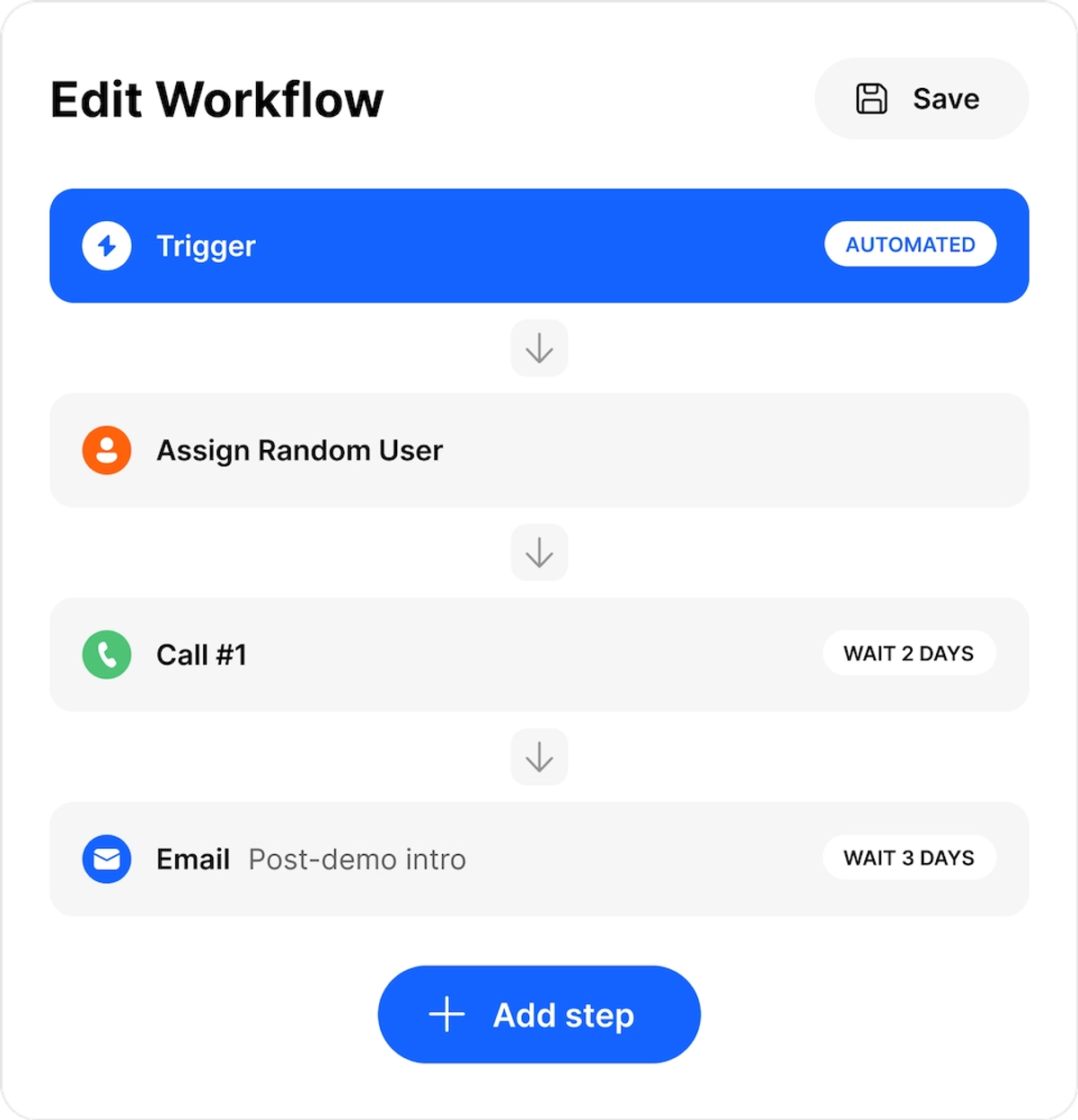
Or, set follow-up reminders to get personalized with a low-volume approach.
Templates start the conversation — Close keeps it going. Automate your entire cold email follow-up sequence with Workflows, so no lead slips through.
How to Write Better Cold Emails: 7 Best Practices
The average cold email response rate hovers around 8.5 percent. Let’s make you the exception—in a really good way. ✌️
Check out these seven best practices for better cold emails—and more responses.
1. Know Your Buyer Persona and Where They are in the Sales Funnel
Your buyer persona (or ICP) provides context on your customers' needs, goals, and challenges, helping you craft super-relevant cold emails.
Something else to know? Where they are in your sales funnel. If they are in the awareness stage—versus the consideration stage—your messaging will be different. (At least, if you want to resonate.)
Here’s how to execute this:
- Build that buyer persona: Outline pain points, discover preferred communication channels, and include essential information about who your lead is. Share it with your team, then, use that persona to enhance your cold emails.
- Track leads in the sales funnel: The right CRM will offer real-time insights on your sales funnel—and the position of leads within. Close even includes automation tools to send specific email outreach, based on triggers inside the funnel.
Once you’ve built solid buyer personas and sales funnels, use them. Especially here.
2. Set Up Automation to Personalize at Scale
Personalized outreach returns better engagement and response metrics. But you’ll need automation to do it at scale.
You can automate different ‘personalization’ strategies. For one, lead enrichment: automate lead enrichment via tools and integrations that capture the data, deliver it to your CRM, and set you up for personalization—automatically.
But, really, how do you drive automation to personalization?
- Exploit dynamic fields and tags: Dynamic fields and tags let you add lead data (e.g., name, company name, etc.) to your email templates automatically.
- Segment by customer persona: Define your customer segments so you can create ‘personalized’ template batches that target similar pain points or value props and then further automate the templates with dynamic fields.
- Automate ‘personalized’ video outreach: The right tools (like Sendspark) can sync with your email automation platform and autofill variable fields in your video outreach, too.
Personalize cold outreach via automation to create effective emails—without spending (read: wasting) tons of time on ‘manual’ personalization.
3. Do Your Research in Batches
Automation makes it easy(er). But don’t get carried away sending personalized emails to and fro. Personalization works best when it’s backed by research.
Batch time to research prospects—and make sure they’re highly qualified—before adding them to your cold email outreach list.
Here’s how to do that:
- Practice ‘time blocking’: Time blocking involves dividing your sales day by activities—and focusing only on that activity during that time block. Lead research? One of those blocks.
- Develop your qualification process: Initial lead research—and qualification—is central to effective, relevant cold outreach. Get your qualification process in place to make the most of those time chunks.
Research, ✅. Now, how do I use it?
4. Use Multiple Outreach Channels for Better Success
Your outreach strategy includes more than just cold emails, right?
… Right?
Multi-channel sales outreach broadens your reach and boosts response rates by 37 percent over single-channel campaigns (according to this study).
It should work off—and with—your cold email campaigns.
So, how?
- Create Workflows in Close: Workflows allow you to create multi-channel, multi-step processes that reps follow for the best multi-faceted outreach possible. Call, email, SMS—and more—it’s all in the Workflow!
- Identify relevant social media: Call, email, and SMS cover your ‘typical’ sales outreach, but social media offers many opportunities to engage with leads, too! Craft posts, engage with targets, and send DMs—if that works for your brand. (Hello, LinkedIn! 👋)
- Hone your cold calling skills: Heard of cold calling? Cold calling is more personal—even than a personalized cold email. And depending on your industry, lead expectations, and staffing situation—it might be the better option.
Multi-channel outreach is important. However, what matters most is using your potential customers' preferred outreach channel. So, get to know them—and what they like.
5. Use an Email Warmup Tool to Avoid Landing in Spam
The email warmup process builds the reputation of your email domain as you gradually increase sending volume—and engage for ‘positive responses’ from real inboxes.
That way, your cold emails will reach the inbox, not the spam, promotion, or update folders.
Your secret weapon? An awesome email warmup tool. Here’s how to prep:
- Keep your data clean: Messy data will provoke ‘bouncing’ emails, which damage domain health.
- Choose the right tool: The right email warmup tool for your budget and goals will improve your ‘email credit score’ in a jiffy.
- Use Close: Close automatically ramps the number of emails you send when doing campaigns. Win!
Now that your (potential) customers are ‘primed’ for your message, make sure it’s a good one. In fact, run some tests first.
6. A/B Test Your Cold Email Flows
The classic A/B test can guide cold emails to the most effective, most response-worthy version of themselves.
There are several things to test and ways to do this:
- Check your sample size: To get statistically significant data (the stuff you need), you’ll need a large enough group of qualified leads to split test. When you have that …
- Test time and day: Split test your emails to go out at different hours—and different workdays (or weekends)—to see how they perform.
- Appraise different email elements: Subject lines, CTAs, visual images, body content—all that can (and should) go through A/B testing.
- Review analytics: The Sent Email Report in Close makes A/B testing of subject lines and email content easy—and helps you understand the overall impact of your email efforts. Popular email marketing platforms (like Mailchimp) do this, too.
Use your A/B test results to optimize your cold email flows. And then, keep testing.
7. Measure the Success of Your Cold Email Campaigns
You are pouring hours, energy, and resources into this cold email campaign.
It’d better work—well.
You’ll need to track the results—and compare them to benchmarks—if you want to succeed and continue in that success.
So, finally, how to measure the success of your cold email campaigns:
- Know your benchmarks: ‘Average’ open rates (44 percent), reply rates (8.5 percent), etc., are fine to start. But discover your baseline numbers—and what you’re aiming for. (Also, try to find the benchmarks for your industry and the role of your lead [eg. CEO vs. low-level manager], which will provide more realistic targets.)
- Close + Workflow Reporting: Okay, it doesn’t have to be Close, but our CRM offers built-in email reporting to gauge your campaigns—from bounce to response rates, (& anything else you’ll need). And beyond that cold email, you can even break down response rates for each Workflow step!
- Consider the big picture: What does that high email conversion rate actually mean? It means your targeting is on-point, and you’re reaching the right people effectively. This isn’t just about “good numbers.”
Keep iterating. Keep learning. Put your data to work—and go, grow, go!
Frequently Asked Questions About Cold Email Templates
What is the best cold email template?
There isn't one template that works for every prospect. The best cold email template depends on your audience, industry, and where the prospect is in the buying journey. Referral emails, data-backed emails, and personalized outreach typically outperform generic sales pitches because they're more relevant and establish trust faster.
How long should a cold email be?
Aim for 50–150 words whenever possible. Shorter emails are easier to read, especially on mobile devices, and respect your prospect's time. Focus on one problem, one value proposition, and one clear call-to-action.
Should I personalize every cold email?
Yes—but personalization doesn't have to mean spending 20 minutes researching every prospect.
Simple personalization like mentioning:
- their company
- a recent announcement
- their industry
- a mutual connection
- a relevant challenge
is often enough to make your outreach feel authentic.
What's a good cold email reply rate?
Reply rates vary by industry, targeting quality, and personalization.
As a general benchmark:
MetricTypical RangeOpen Rate40–60%Reply Rate5–15%Positive Reply Rate1–5%
Instead of chasing industry averages, track your own performance and continuously improve your messaging.
How many follow-up emails should I send?
Most replies come after the first email—but many opportunities are created through consistent follow-ups.
A simple sequence looks like this:
- Day 1 — Initial email
- Day 3 — Follow-up #1
- Day 7 — Follow-up #2
- Day 12 — Final follow-up
Stop if someone asks not to be contacted.
Should I include a meeting link in my first cold email?
It depends.
If your email is highly personalized and you're reaching out to a warm prospect, including a scheduling link can reduce friction.
For colder outreach, asking a simple question or requesting permission to continue the conversation often generates better response rates than immediately pushing for a meeting.
Is cold emailing legal?
Cold emailing is legal in many countries when done responsibly, but regulations vary by region.
Make sure you understand the requirements of laws like GDPR, CAN-SPAM, and other local privacy regulations before launching campaigns. Always provide a legitimate business identity and honor unsubscribe requests.
Can AI write effective cold emails?
Yes—but AI works best as a starting point, not a replacement for human judgment.
Tools like ChatGPT can help generate subject lines, improve clarity, suggest personalization ideas, and create variations for A/B testing. You'll still get the best results by reviewing the output and adding context that's specific to your prospect.
What's the biggest mistake people make with cold emails?
The most common mistake is making the email about yourself instead of your prospect.
Instead of explaining everything your company does, focus on:
- the prospect's problem
- the outcome you can help them achieve
- one simple next step
The easier your email is to understand and respond to, the more likely you'll get a reply.
Final Thoughts: When to Use a Cold Email Template
The temptation? Convert to templates heart, mind, & soul. Never write an original email again.
That’s a bad call. Templates have their place—and are incredibly effective at saving you time—but they have their place.
Here’s when to use a cold email template:
- When you’re sending the same message often. Templates allow you to copy & paste the wheel—instead of reinventing it every time you want to send the same message.
- When responding to standard inquiries. Standard inquiries typically have a standard response. Perfect opportunity for a template.
- When you can personalize by category or persona. Again, templates can (and should) be personalized. But for that to work at scale, your leads must match your ideal customer personas.
Your scenario not on the list? Don’tuse a template.
But if it is, it’s time to test out using templates.
And make sure you try out Close, too. Our all-in-one CRM streamlines your multi-channel outreach with Workflows—and elevates the entire sales experience. Watch our on-demand demo to learn how it works.