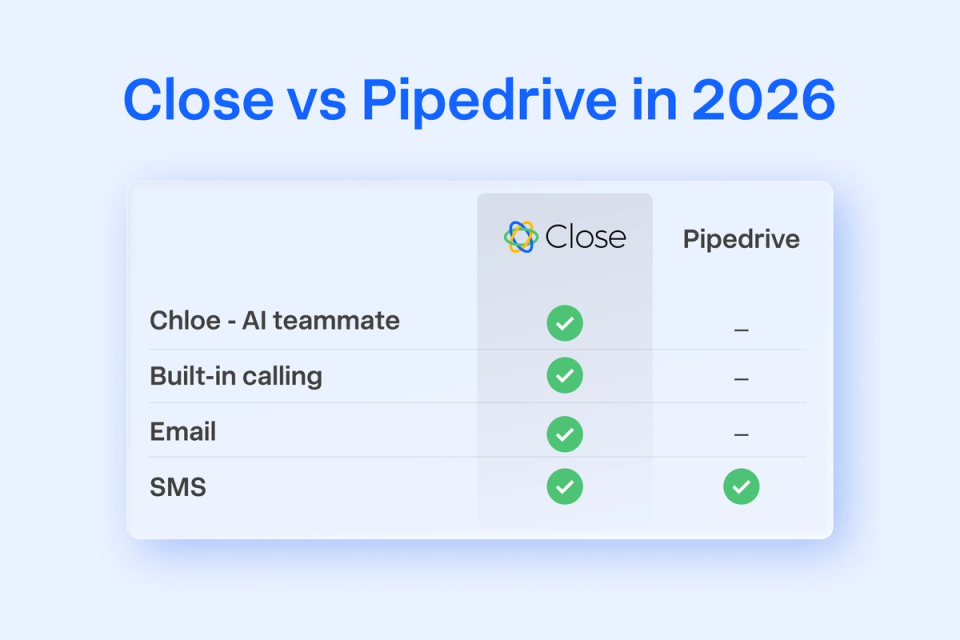
The short version
1
If your team makes phone calls to sell, Close wins. Native power dialer, native SMS, and Chloe Voice, our AI outbound agent that is generally available today, not on a waitlist.
2
Pipedrive discontinued its native Caller in 2022. If you sell by phone, you are running Pipedrive plus a paid dialer (Aircall, Kixie, JustCall, CloudTalk, or Twilio) plus usually an SMS tool. That is three bills and three activity histories, not one.
3
Pipedrive's late-2025 tier migration repriced a lot of existing customers upward with limited notice, which is still one of the loudest complaint themes on Capterra and Reddit. Worth asking your Pipedrive rep about at renewal.
4
If your team runs a mostly-visual pipeline with light outbound and a lot of field or mobile work, Pipedrive is still a legitimate answer. We name the two places it genuinely wins in a section below.
5
Migration from Pipedrive to Close is a CSV export plus a guided import. Most teams cut over in about a day, not a week. We handle the field mapping.
Why we rebuilt this comparison
Most Close vs Pipedrive posts on the internet were written when both products looked very different than they do today. Pipedrive shipped a real AI Sales Assistant, announced an agentic AI experience in February 2025, and reshuffled its plan tiers in late 2025. We shipped Chloe, our AI teammate, made her available on every Close plan, put Chloe Voice into general availability, and cut our page load times in half against the incumbents. The comparison from 2023 is not the comparison you should be reading in mid-2026.
So we rebuilt it from scratch. Same evaluation criteria you would use if you were sitting in a renewal meeting: calling, AI, pricing at 5 and 15 reps, migration time, reporting, mobile, and the honest question of who each tool is really for. Where Pipedrive is the better answer, we say so and explain why.
If you'd rather see Close in your own account before reading, start a free 14-day trial (no credit card). If you want a human to help you scope a switch, book a free Pipedrive-to-Close migration consult. Otherwise, keep reading.
Close vs Pipedrive at a glance
This table is the fast answer. Every claim in it is supported in the sections below and the Sources block at the end. Prices are 2026 annual list prices per seat per month.
Category — Close — Pipedrive
Starting price — $9/seat/mo (Solo, annual). $35/seat/mo (Essentials, annual). — $14/seat/mo (Lite, annual). $39/seat/mo (Growth) is the first usable tier.
Native calling — Yes. Power Dialer at Growth ($99/seat/mo). Predictive Dialer at Scale. — No. Pipedrive Caller was discontinued in 2022. Customers use Aircall, Kixie, JustCall, or Twilio.
Native SMS — Yes on every paid plan. — No. Third-party integration required.
AI agent — Chloe Voice (outbound voice agent), Chloe Chat, Notetaker, Pipeline Suggestions, AI Enrichment. GA on every plan, usage-based. — Sales Assistant + Pulse (insights/recommendations). Agentic experience announced Feb 2025, still beta as of mid-2026.
AI email drafting — Included on every plan via Chloe. — Included on Premium ($49/seat/mo) and above.
Lead gen (chatbot, forms) — Native forms on every plan. — LeadBooster add-on at $32.50/mo on top of any seat plan.
Email marketing — Not a marketing tool. Bulk sales email at Growth+. — Campaigns add-on from $16/mo (1K contacts) to $417/mo (100K).
Mobile app — iOS + Android with calling, SMS, email, and full rep workflow. — iOS + Android. Great pipeline viewer; consistently rated weaker than desktop by reviewers.
Speed (page loads) — About 50% faster than Pipedrive on inbox, pipeline, and lead views (2024 benchmark). — Baseline.
Fact-check date: July 2026. Pipedrive tier names and prices verified against multiple 2026 pricing breakdowns; sources at the end of this post.
Close and Pipedrive are built on different beliefs about how sales works
This is the most important paragraph in the piece, and the one every comparison post skips. Both tools work. Neither is broken. But they were designed around different assumptions about what a sales rep spends their day doing, and once you see that, the rest of the comparison explains itself.
Pipedrive was designed around the belief that sales is a visual game. The drag-and-drop pipeline board is not a feature. It is the product. The AI Sales Assistant recommends which cards to move next. Deal-rotting stages turn red. The mobile app is designed for a rep looking at their pipeline on the way to a meeting. Everything in Pipedrive is optimized for the moment a rep opens the app and asks: what should I focus on right now.
Close was designed around the belief that sales is a communication game. The unified inbox is not a feature. It is the product. Calls, emails, and SMS all land against the lead record without a rep doing anything. Chloe transcribes, summarizes, and files the call the moment it ends. Everything in Close is optimized for the moment a rep opens the app and asks: who do I need to talk to right now, and what did we last say to each other.
Both beliefs are defensible. Both produce a good CRM for the sales motion they were designed for. The mistake most teams make is picking based on price or brand awareness and then quietly fighting the tool's design center for two years.
Where Close wins, and by how much
1. Native calling and SMS on every plan
This is the biggest single delta between the two products, and it is the reason most teams leaving Pipedrive cite when they explain the switch. Pipedrive discontinued its native Caller in 2022. There is no native power dialer, no predictive dialer, and no native SMS. The standard fix in the Pipedrive ecosystem is to bolt on Aircall, JustCall, Kixie, CloudTalk, or Twilio at $30 to $50 per seat per month on top of the base plan, plus a separate SMS tool. That is Pipedrive plus a dialer vendor plus an SMS vendor, and your activity history is fragmented across three systems.
Close ships with a Power Dialer at the Growth tier and a Predictive Dialer at Scale, both of them native to the CRM. Every call is auto-logged, auto-recorded, and auto-summarized against the lead. SMS and email are native too. One seat, one timeline, one bill. If your team's day involves picking up a phone, that difference alone is worth several thousand dollars a year in bolt-on cost, before you count the time reps save not tabbing between three tools.
2. Chloe Voice is generally available. Pipedrive's agent is still beta.
Pipedrive's AI Sales Assistant is real and getting better every quarter. It surfaces insights, predicts win probability, and drafts emails on Premium and above. That is genuine value. But it is fundamentally a recommendation layer over your data. It does not make calls, book meetings, or move deals on its own. Pipedrive's own AI feature list confirms this: prompts, predictions, and email drafting, mostly gated at Premium. Pipedrive announced an agentic AI experience in February 2025. As of mid-2026, it is still in beta with limited rollout.
Chloe is a different category. She is an AI voice agent that makes outbound calls, qualifies leads, handles objections, and books meetings, and she updates the CRM the second anything changes. She is generally available, included on every Close plan, and priced on usage-based credits rather than a flat surcharge. Other AI agents read from a script. Chloe reads live CRM data before every call. If the near-term future of an SMB sales team is more AI-led outbound, the tool that ships a real voice agent by default is a materially different bet than the tool that ships better dashboard recommendations.
3. Speed you can actually feel
We ran our own benchmark comparing page load times across the four screens sales reps touch most: the inbox, the pipeline, the individual lead view, and the average Largest Contentful Paint across pages. Close was roughly 50% faster than Pipedrive, HubSpot, and Salesforce on those measures. You can disagree with the methodology if you want. What you cannot disagree with is what a rep feels when they open a lead record 60 times a day. Half a second per open is 30 seconds a day, which is 2.5 hours a month, which is a real amount of selling time we handed back to the rep. Internally, 87% of new Close users place a call, send an email or SMS, or host a meeting in their first week. Speed of activation matters, and this is where you feel it first.
4. Pricing that does not repackage you mid-contract
Pipedrive's marketing price is $14 per seat per month, and that number is real. What most buyers miss is the add-on layer that sits under it. LeadBooster (chatbot, web forms, prospector) is $32.50 per month flat on top of any tier. Campaigns (email marketing) is $16 to $417 per month depending on contact volume. Web Visitors is $49 to $299 depending on traffic. Automation is gated behind the Growth tier ($39 per seat). Lead scoring is gated behind Premium ($49). Audit logs are gated behind Ultimate ($79).
The other pricing issue that has come up on renewal calls all year is Pipedrive's late-2025 tier migration, which repriced a number of existing customers into higher plans with limited advance notice. If you are on Pipedrive today, it is worth pulling up your invoice from October 2025 and comparing it to your invoice from March 2026. If the line changed, you are not the only one.
Our own pricing goes the other direction. Chloe is on every plan. Calling, SMS, and email are native at Essentials ($35 per seat) and above. Power Dialer lands at Growth ($99). We charge for usage-based call minutes and AI credits so a small team is not paying for capacity they do not use. It is not cheaper on the sticker. It is cheaper on the total at almost every team size we have benchmarked, and we do not repackage you mid-contract.
5. Support answered by humans, and fast
Support is not usually the headline in a CRM comparison, but it is the thing you will feel every time something breaks. Close support is free on every plan, answered by an in-house team across time zones, with average resolution under two hours in typical inbound tickets. It is the most consistently praised category in our G2 reviews.
Pipedrive's support gets one of the loudest complaint themes across G2, Capterra, and Reddit: long waits, chatbot deflection, and no phone support on lower tiers. Ask a Pipedrive user how their last ticket went before you sign anything.
As one G2 category summary put it, Close wins in 70 out of 73 head-to-head review categories against Pipedrive on G2, including quality of support, workflow capability, and call center features.
Where Pipedrive wins, and by how much
We would not publish this post if this section were empty. Pipedrive genuinely wins in two places, and if either describes your team, Pipedrive is the more honest answer.
1. Pipeline visualization as the primary workflow
Pipedrive's drag-and-drop pipeline board is the cleanest sales view at any price point under $100 per seat. Deal-rotting turns cards red when they sit idle past a threshold you set. Stages can be customized per pipeline. It reinforces the discipline of moving deals forward without a rep needing to type anything. If your team is a small pipeline-first crew closing 20 to 40 deals a month and calling is a secondary motion, Pipedrive's design center matches your workflow better than ours does.
This is not marketing generosity. This is the pattern we see when teams evaluate both tools and pick Pipedrive: they are pipeline people, not phone people. A well-cited May 2026 Reddit thread captured it well: "Close tends to excel for teams that are heavily engaged in cold calling, outbound sequences, sales automation, high-volume follow-ups. On the other hand, Pipedrive is often preferred for its user-friendly interface and is particularly beneficial for pipeline visibility, deal tracking, smaller teams, quick adoption." We agree.
2. A deeper marketplace of third-party integrations
Pipedrive publishes roughly 500 marketplace apps. Our marketplace is smaller. If your team has already invested in a specific niche integration (a vertical-specific quoting tool, a legacy accounting connector, an obscure telephony partner), Pipedrive is more likely to have it out of the box.
The structural reason we have fewer integrations is that we ship the tools you would otherwise bolt on: calling, SMS, sequences, workflow automation, and Chloe. The integrations we do keep are the ones that actually matter for most teams: Zapier, HubSpot, Stripe, Quickbooks, Google Workspace, and Microsoft. If your integration list is short and outside those, worth checking our marketplace before assuming.
What each tool actually costs at 5, 10, and 15 reps
The sticker prices are misleading in both directions. Here are the honest all-in numbers for a typical SMB team, assuming annual billing, the plan tier most teams actually pick, and the add-ons a working sales team ends up needing. The Pipedrive column includes a third-party dialer, because at any real phone volume you will end up buying one.
Team size — Close (Growth annual, Chloe usage-based) — Pipedrive (Growth annual + LeadBooster + Aircall)
5 reps — $495/mo seats + ~$100 usage = ~$595/mo — $195/mo seats + $32.50 LeadBooster + ~$150 Aircall = ~$377.50/mo
10 reps — $990/mo seats + ~$200 usage = ~$1,190/mo — $390/mo seats + $32.50 + ~$300 Aircall = ~$722/mo. Automation cap of 50/company starts biting.
15 reps — $1,485/mo seats + ~$300 usage = ~$1,785/mo — Typically upgrade to Premium at $49/seat = $735 + ~$450 Aircall = ~$1,185/mo. LeadBooster now bundled.
Pipedrive is cheaper on paper at every size, even after you add the dialer. The trade is that you are buying a lighter product with a fragmented activity history: your calls live in Aircall, your CRM lives in Pipedrive, and your SMS lives somewhere else. The value question is not "which sticker is lower." It is "which product does the work your team needs, in one place, without the activity fragmentation." Pipedrive is often the right answer for pipeline-first teams. Close is almost always the right answer for phone-and-follow-up-heavy teams.
Five questions that will tell you which tool you actually need
Skip the demos for a minute. If you can answer these five questions honestly, the choice is usually obvious before you talk to a sales rep on either side.
- What are you using for calling and SMS today, and what is it costing per seat on top of your CRM. If you are already paying for Aircall or Kixie or JustCall, that line item goes to zero on Close. If you are not making calls at all, the Close advantage evaporates.
- Where does your call and text activity actually live: in your CRM, or in your dialer tool. If the answer is "the dialer," your CRM is not the system of record. That is fine until it isn't, and it usually isn't around the time you hire your third rep.
- Have you actually used Pipedrive's AI agent in production yet, or are you still on the waitlist. Announced-versus-shipped is a real distinction. Chloe Voice is running production calls today.
- Is your reporting answering the questions your sales leader actually asks. If you are on Pipedrive Growth and want forecasting or custom reports, you are looking at a $49 or $59 per seat upgrade before you can even try to answer them.
- Did your Pipedrive bill change in the late-2025 tier migration, and did you feel it was handled well. If the answer is "yes and no," you are already having the renewal conversation, you just have not scheduled it yet.
How long a Pipedrive-to-Close migration actually takes
This is the question every buyer asks in the demo, and the answer is a lot less scary than it sounds. Pipedrive exports cleanly to CSV. Close imports cleanly from CSV. There is no complex object model to translate, and no API-only fields hiding in either product. For most 3 to 15 rep teams, the actual switch is measured in a day, not a week.
Our official Pipedrive migration doc lays out the whole flow. Short version: export Leads, Deals, Organizations, People, Activities, and Notes from Pipedrive as CSV, and send them to our support team. We handle the field mapping. The Pipedrive-to-Close terminology map is unambiguous:
- Pipedrive Organizations become Close Leads.
- Pipedrive People become Close Contacts.
- Pipedrive Deals become Close Opportunities.
- Pipedrive Notes stay Notes.
- Pipedrive incomplete Task activities become Close Tasks.
- Pipedrive completed Call activities become Close Calls.
If you would rather have a human walk you through the scoping first, book a free Pipedrive-to-Close migration consult. A migration specialist reviews your Pipedrive setup, maps custom fields to Close Lead Statuses, and gives you a realistic timeline before you commit.
Teams that made the switch, in their own words
The most useful signal is not what we say. It is what teams who already ran this evaluation say on the other side of it. Three quotes we didn't write, from operators who did.
"Pipedrive is great, it has a lot of features. But we sensed as we wanted to grow prospecting efforts, its features were limited. We could build a remote sales team with Close in a more scalable way."— Ryan Groth, Founder, Sales Transformation Group
"Close is not bloated with functionality making it difficult to migrate to or use. I moved from Pipedrive to Close, so it's a great comparison, and it was simple to implement all the existing views and flows I had in Pipedrive."— Philip O'Flynn, Co-founder, AdPunch.co
"I have used HubSpot, Pipedrive, Google Sheets, Airtable, and more as a CRM, but Close is simply awesome. If I had questions, the support was amazingly fast in their replies, and that is all I need."— Patrick Breitenstein, Co-Founder and CEO, RisePartner
For a longer-form version of the switching story, read how ResQ Club moved off Pipedrive. Their Head of Sales, Venla Wiik, put it plainly: "We were able to easily import all the old leads from Pipedrive to Close. All of our sales reps were very happy with Close just after a couple of weeks." More case studies are on our customers page.
Which one should you actually pick
The honest answer depends on three questions. Answer them, and the choice usually makes itself.
- How much of your team's day is on the phone. If it is more than 30%, Close. If it is less than 10%, Pipedrive. In between, look at the other two questions.
- How much of your team's future will be AI-led outbound. If you already know you want an AI voice agent making qualification calls in the next 12 months, Close, because Chloe Voice is doing that work today. If AI is a "nice to have someday" bullet, Pipedrive's Sales Assistant is fine for now.
- How much of the near-term future are you spending stitching together dialer plus CRM plus SMS. If you have already been through the Aircall integration once and want out, Close. If you genuinely do not need a phone workflow, Pipedrive.
"The wrong reason to pick a CRM is because a competitor has a shinier feature. The right reason is because the tool matches the way your team already sells. Fight the tool for six months and you will lose. Match the tool to the motion and it disappears into the background, which is what a good CRM is supposed to do."
Dialed In
If you liked the honesty of this piece, subscribe to Dialed In, our monthly newsletter for founders and heads of sales running lean SMB teams. One long argument, one short tactic, no fluff.
Where to start
If you already have Pipedrive and the stack has crept, see our side-by-side Close vs Pipedrive comparison. If you want a human to scope the switch for you, book a free migration consult. If you want to see Chloe live before you talk to anyone, watch her run a real call. And if you want to just try Close in your own account, start a free 14-day trial (no credit card).
Verticals That Win With Close
Typical Pipedrive stack (5 reps, Growth + Aircall + LeadBooster)
~$377/mo
Consolidated Close stack (5 reps, Growth + Chloe usage)
~$595/mo
Net monthly delta
Roughly $218/mo more, on one bill instead of three
What that buys
Native power dialer, native SMS, GA AI voice agent, unified activity timeline, no add-on line items, no mid-contract repackaging
Migration time (typical 3–15 rep team)
About a day. We handle the field mapping.