
 Improvement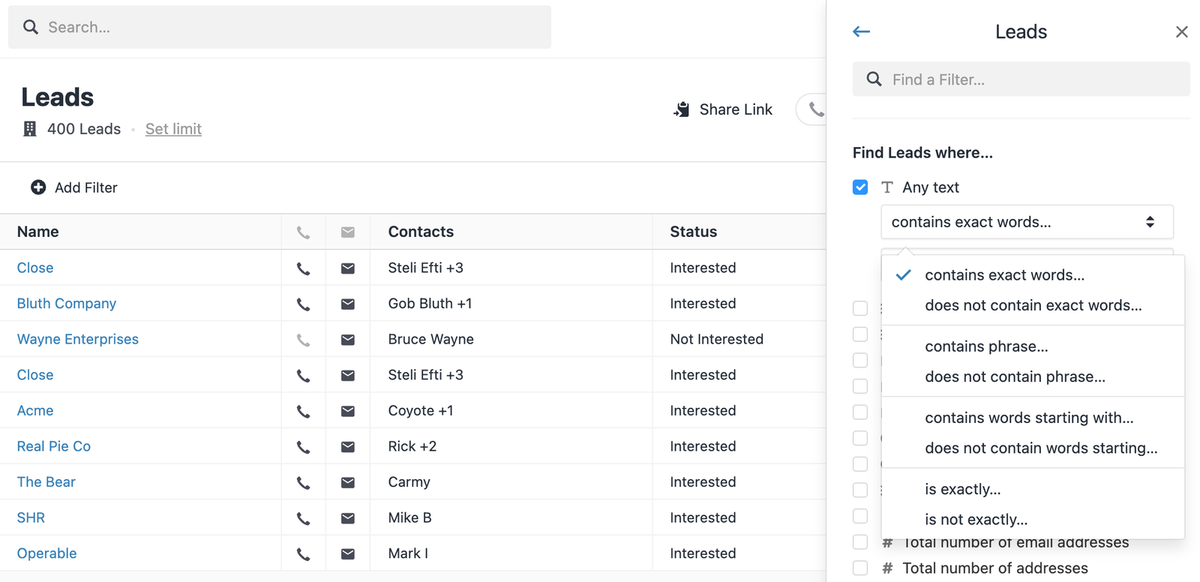
New operators are available in the Lead Filter Sidebar. The new operators (and their negative counterparts) are:
- "contains exact words" — replaces "contains exactly"
- "contains phrase" — a new one that specifies "full words in this order"
- "contains words starting with" — replaces "contains"
- "is exactly" — a new one used in some custom fields, for example, when an "xyz" query must NOT match against "xyz abc". This is important when you store some kind of identifier in your Custom Fields.
We've added more criteria to choose from when filtering to help find the data you're looking for:
- Filter Sidebar now shows an "any text" filter under every search object. This allows you to perform a "full-text search" where we'll search through every field on the object you select for the entered phrase.
- The "Date last updated" filter was added to the Sequences section in the Filter Sidebar.
- The "Local Time" filter in the Filter Sidebar now supports minutes. Previously, only hours were supported.
- Filter Sidebar now supports additional filters under the "Find any status change where…" section for Leads and Opportunities. Previously, you would only be able to filter by the latest status change.
- We have exposed two additional operators ("is on or before" & "is on or after") in date filters in the Filter Sidebar. That should give more flexibility when choosing a date, whether a day is inclusive or not.
- The "A {activity type} activity is present" filter (e.g., "A call is present") is added.

