Si vous êtes une équipe technique qui a besoin d'évoluer sans payer trop cher pour un logiciel de vente d'entreprise, vous avez trouvé l'outil de vente qu'il vous faut.
Améliorations
Améliorations du mois d'août
Nouveautés
Remarques
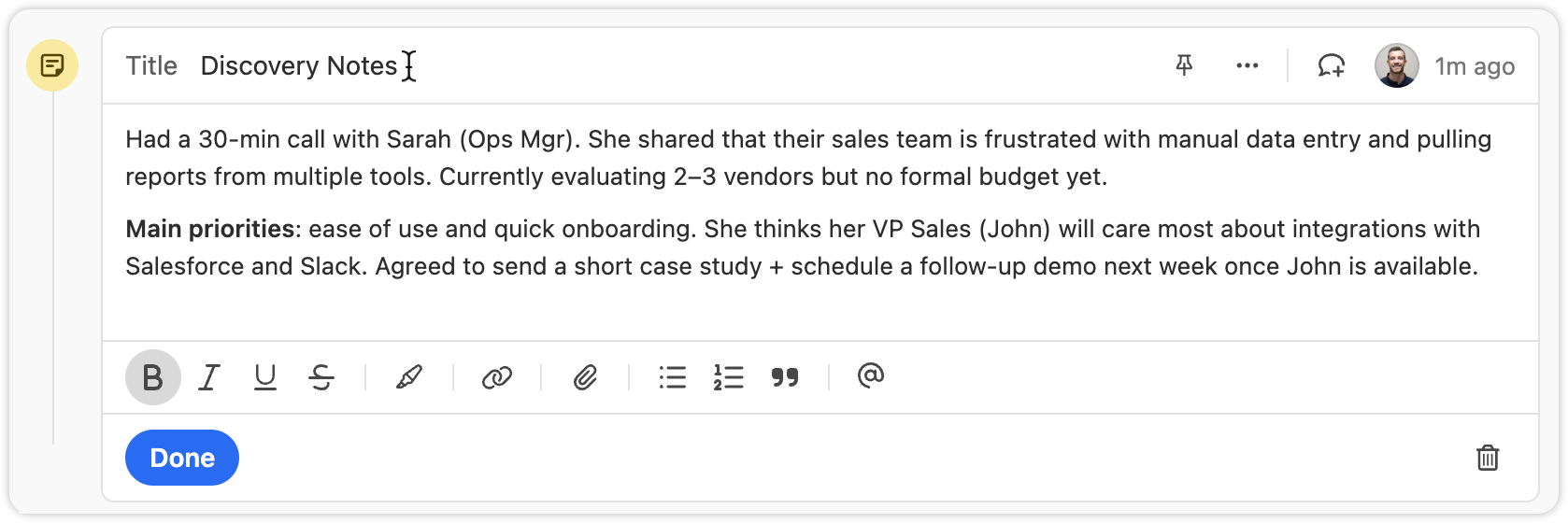
You can now set custom titles on Notes.
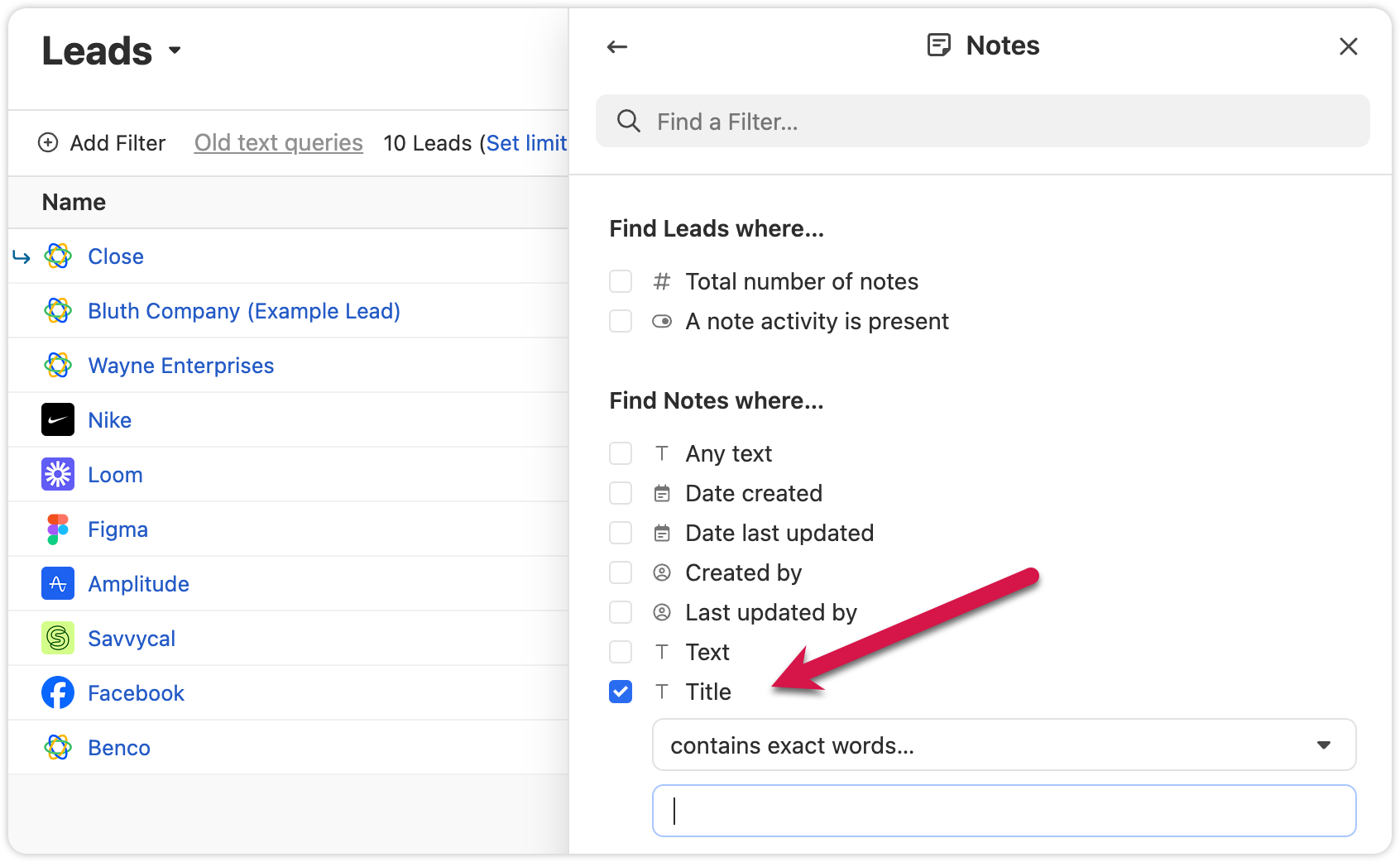
Titles are also searchable, making it easier to find key information in Smart Views
Export Lead Fields
We added the option to only export columns that are included in that specific Smart View. This will help you get only the data you need.
Autres améliorations
Extra confirmation is now required when deleting custom fields, helping prevent mistakes.
Voicemail notifications now show a preview of the transcript when collapsed.
We added the abillity to cancel inline edits on the Lead page by pressing "esc"
Corrections de bugs
The “all users” option in User Select is now searchable.
The member count in the membership view updates correctly when switching between organizations.
Nouvelle fonctionnalité
Pinned Notes & Custom Activities
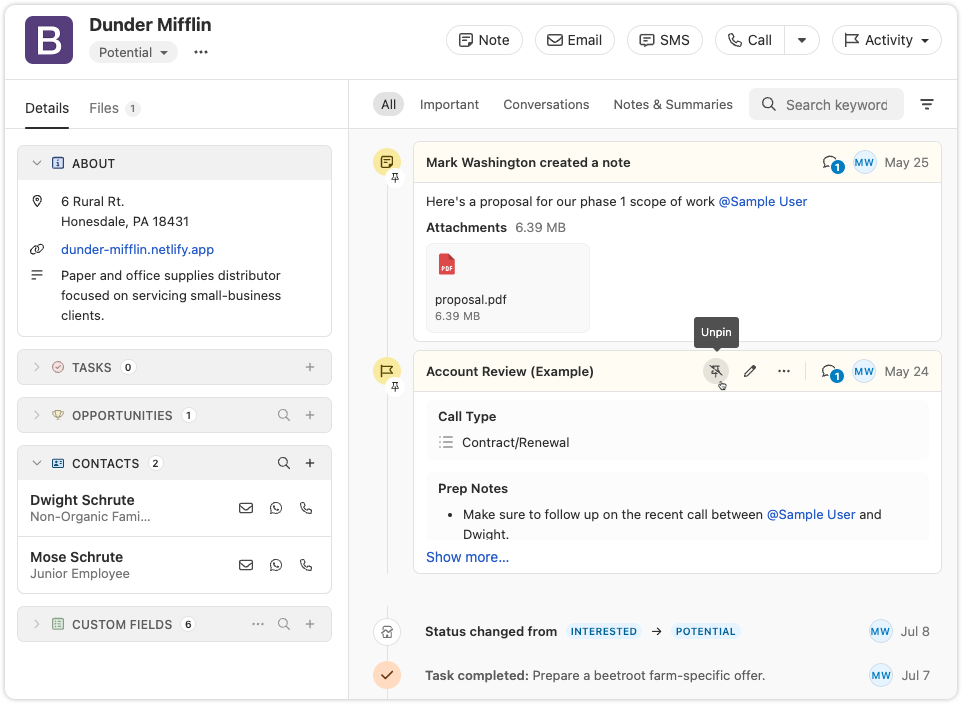
You can now pin Notes or Custom Activities on any Lead in Close. Pinned items appear at the top of the activity feed, making it easy for your team to highlight key info and updates.
Share a summary for your team: Pin a note that gives an overview of the lead’s status or next steps. Anyone who views the lead will see the summary first, helping reduce confusion or missed context.
Resurface important threads: If a note or custom activity contains details that might be needed later—like feedback, deal blockers, or helpful context—pin it so it’s always easy to find.
Cette fonctionnalité est disponible dès maintenant sur tous les plans. Essayez-la et dites-nous ce que vous en pensez !
Nouvelle fonctionnalité
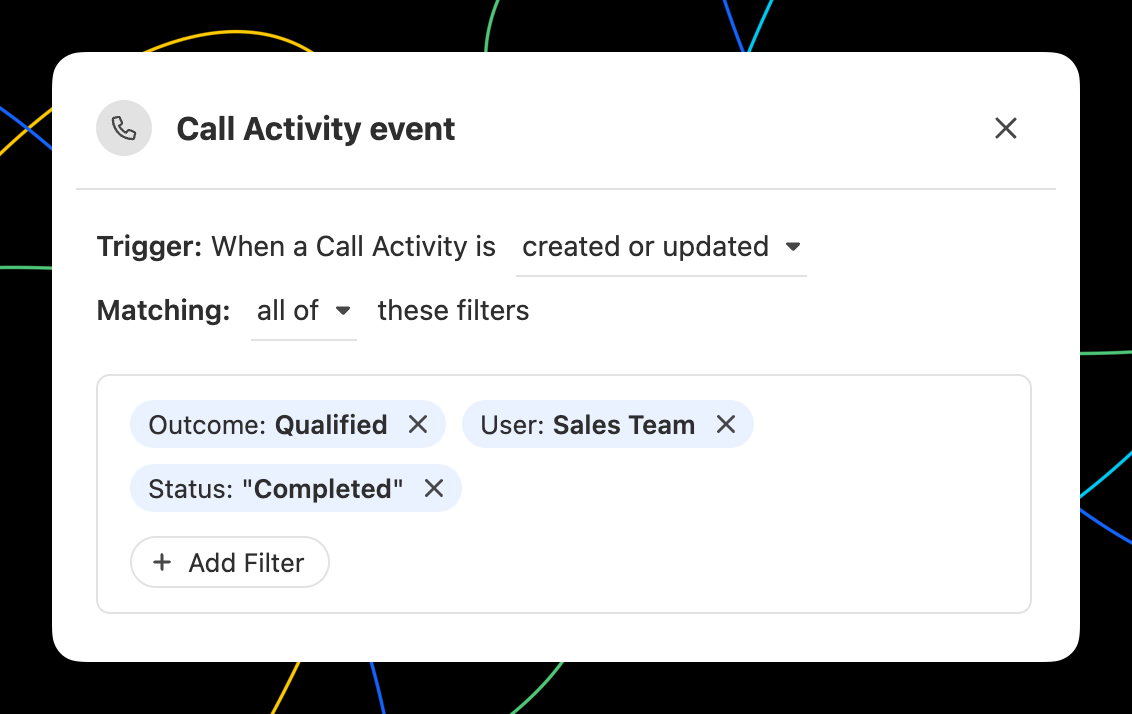
Déclencher des workflows lors de n'importe quel événement d'appel
Dans Workflows, vous pouvez désormais déclencher un workflow dès qu'un événement « Appel » se produit. Toutes les options de filtrage auxquelles vous vous attendez sont disponibles, y compris les résultats! Grâce au déclencheur d'événement « Appel », vous pouvez...
Envoyez automatiquement un e-mail ou un SMS au contact qui a été appelé.
Attribuer automatiquement le prospect à l'utilisateur qui a passé l'appel.
Créez des tâches pour vous avertir ou avertir d'autres personnes lorsqu'un appel répond à certains critères.
Utilisez un appel répondant à certains critères pour mettre à jour les champs du prospect en utilisant le contexte de l'appel avec AI Enrich.
New Integration
WhatsApp Sync via TimelinesAI
TimelinesAI has launched a Close integration that automatically syncs WhatsApp messages to your leads—using our new WhatsApp activity type.
Grâce à cette intégration, vous pouvez :
Automatically create new leads when a WhatsApp chat comes in and no matching contact exists
Log WhatsApp messages as native activities in the Close timeline—including text, locations, and attachments up to 25MB
Match messages to leads using phone numbers in international format
Assign lead ownership based on who owns the WhatsApp chat, the WhatsApp account, or fall back to the integration owner
🎁 Close customers get a special 30-day free trial when signing up with this link. Use code CLOSE15OFF for 15% off forever.
Note: The WhatsApp activity type is also available via the Close API and Zapier—ideal for tools like Superchat or custom-built integrations.
Nouvelle fonctionnalité
Automatically update Leads using Workflows
Automatically update Leads using the new "Update Lead" step in Workflows:
Automatically update any standard Lead or Lead Custom Field.
Map fields from the trigger data to Lead fields.
Use AI Enrich to automate lead enrichment or any other research task!
Nouvelle fonctionnalité
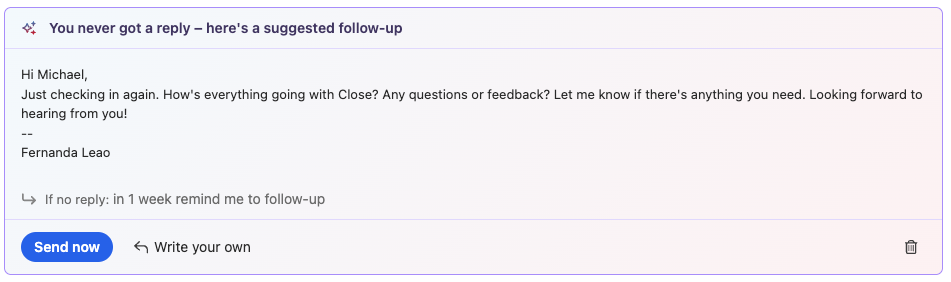
AI Suggestions on Email Reminders
Close will now suggest a follow-up message when an email reminder comes due, helping you take action faster.
Suggestions appear right in your inbox when the reminder is triggered
Send immediately or make quick edits inline
Open in the full editor if you need access to more tools
Améliorations
Améliorations de juillet
Nouveautés
Prise de notes
You can now pause or resume Notetaker recording right from within the app. The meeting reminder bars now show more detailed statuses and recording controls. You can find more information about this feature here - Notetaker
Pause and resume directly from the meeting bar
Flux de travail
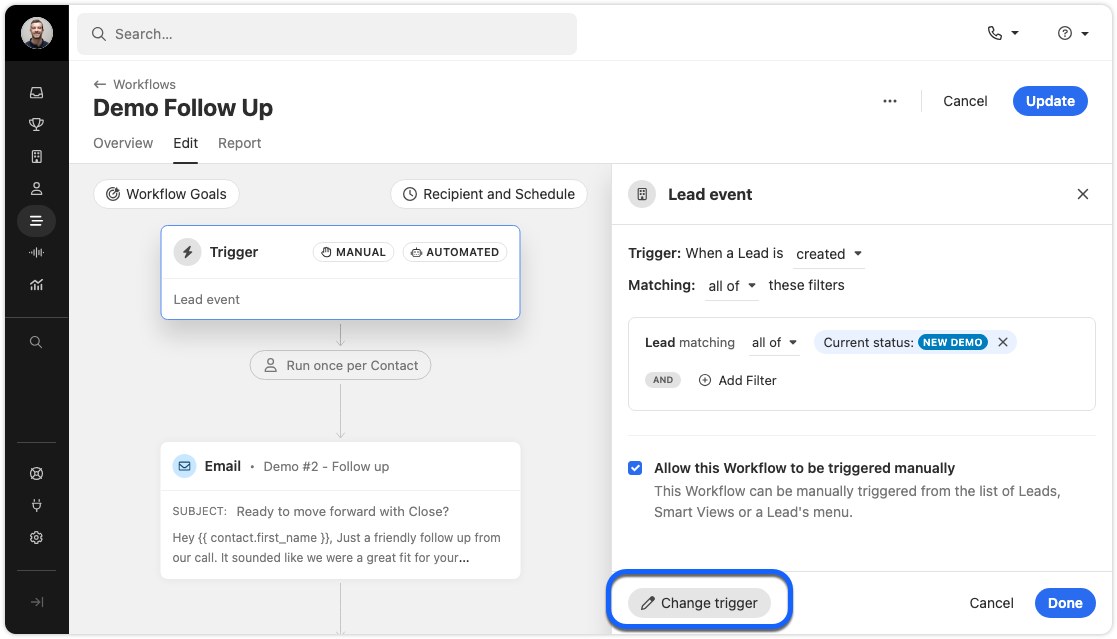
Workflow trigger editing just got easier. Instead of deleting an old trigger to add a new one, you can now “replace” the trigger. If you cancel while adding a new trigger, your old one will stay in place. This ensures your workflow is never left without a trigger.
Change trigger
Filter Improvements
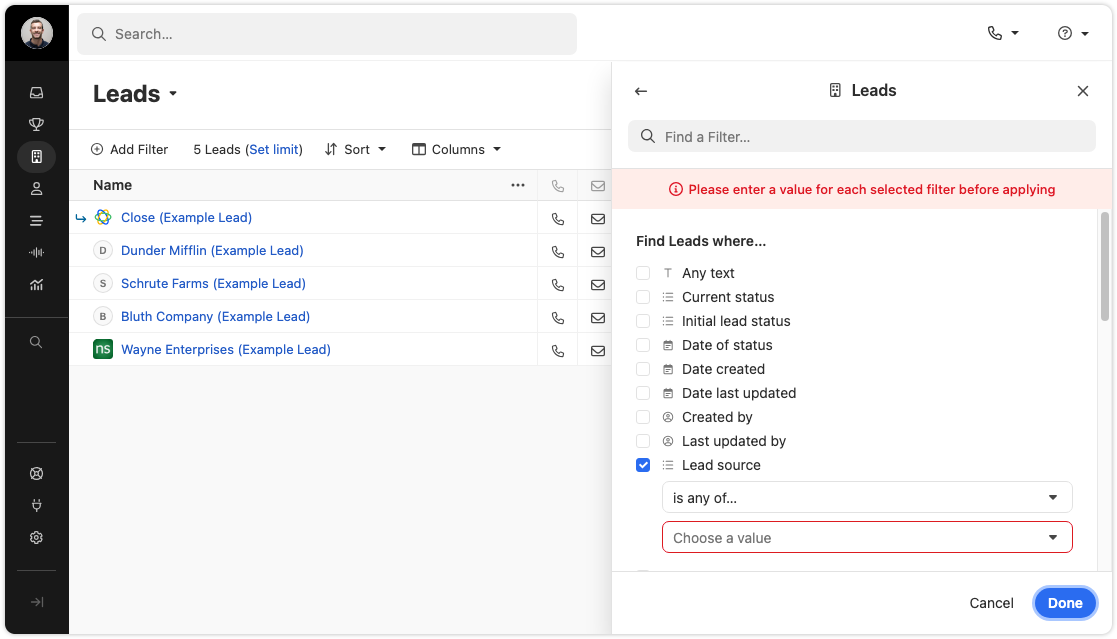
We’ve added a validation check to the filter editor fields for Leads, Contacts, and Workflow triggers. This makes it easier to build accurate filters and avoid mistakes.
Filter validations in action
Import Page
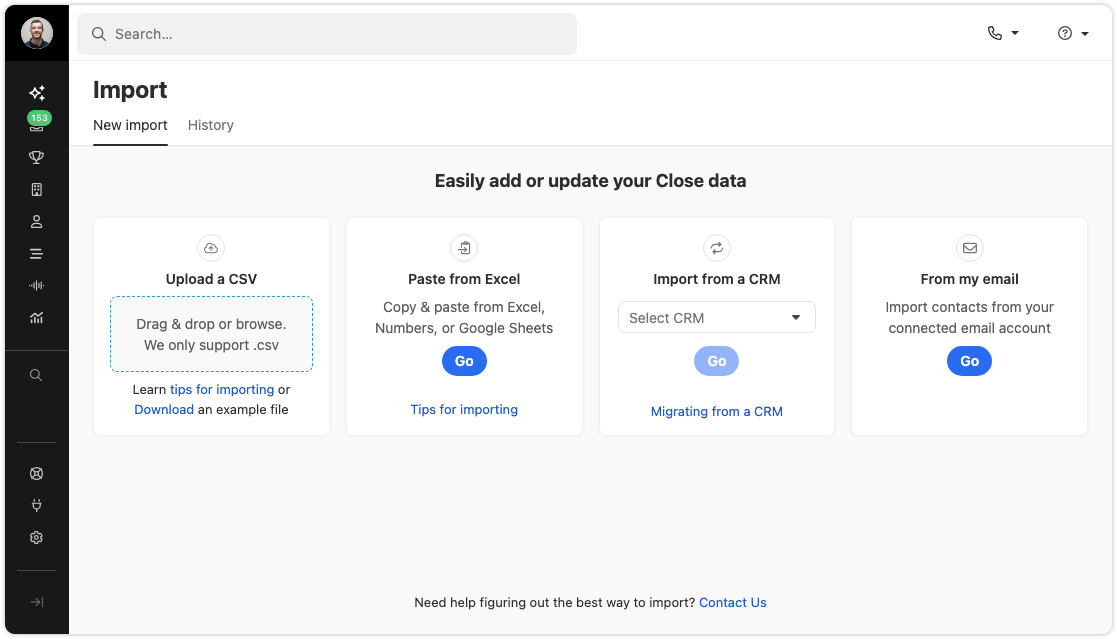
We’ve refreshed the import data page with updated designs and a new panel for importing Potential Leads & Contacts from your connected email. The functionality is largely unchanged, but it’s now easier to find the import options you need.
Import from CSV, migrate from CRM, or from email
Appel
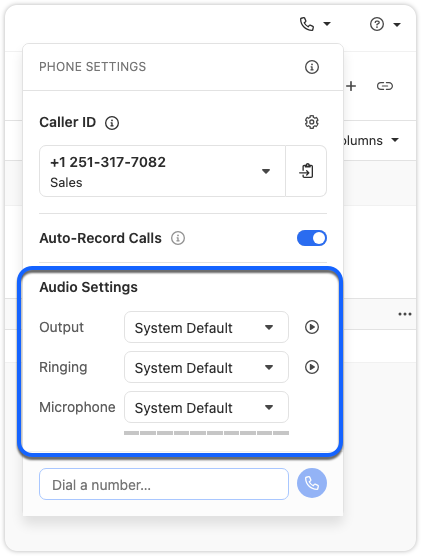
You can now switch devices during an active call. If you need to change your headset or microphone, just use the Phone Settings popover. There is no need to hang up or refresh.
Change your microphone or speaker during a call
Coach Invite and Call Transfer menus in the call bar are now grouped by user availability, and offline users no longer appear in the transfer list. The menus now look and work the same, giving you a faster, more consistent experience.
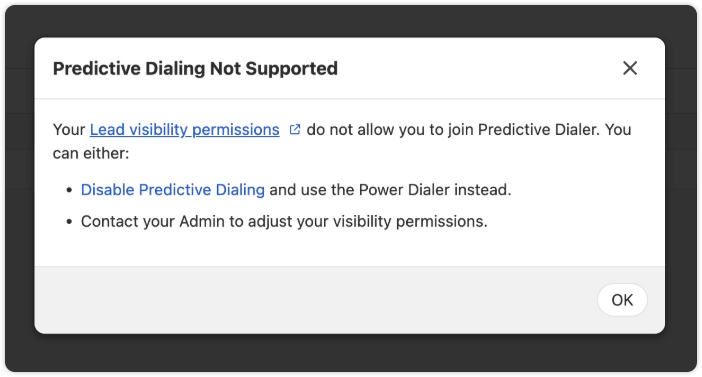
In some cases, the Predictive Dialer can’t be used on a specific Smart View. Instead of a generic “Predictive Dialer Not Supported” message, you’ll now see suggested solutions and a link to our help documentation with more details.
Other Improvements
SMS messages now use smart encoding. This helps reduce delivery failures and can lower outbound message costs. Smart encoding replaces certain Unicode characters with GSM-encoded characters, which helps avoid unnecessary encoding to UCS-2 and keeps your messages within carrier limits.
When creating or editing Custom Fields, the dropdown for field types now displays headings for each section.
Destructive action, such as Delete buttons, now have a more obvious red background to highlight their impact.
Reporting page headers now behave more consistently.
Corrections de bugs
The “Unsaved Changes” modal will no longer appear for a workflow that has just been deleted.
Fixed an issue where the display name of a Contact would not appear during calls.
The 'Create a Workflow' button now works correctly when no workflows exist.
Checkbox alignment in some tables has been fixed.
Nouvelle fonctionnalité
New and improved Calendly integration
We have made several enhancements to Close's integration with Calendly:
Automatically create Contacts when new meetings are booked (including duplicate detection)
"Round Robin" Event Type support
Use the "Sync" button to force update recent changes to your Calendly account into Close
Nous sommes ravis de vous présenter une nouvelle fonctionnalité qui vous aide à suivre et à classer les résultats de vos appels et réunions. Grâce à la fonctionnalité « Résultats des appels et des réunions », vous pouvez :
Classer les résultats des conversations - Créez vos propres catégories personnalisées pour suivre les résultats de vos appels et réunions.
Définissez les résultats pendant ou après les conversations - Indiquez facilement le résultat des appels et des réunions pour mieux évaluer l'efficacité des conversations.
Automatiser le suivi des résultats - Lorsque vous utilisez la fonction de transfert vers la messagerie vocale, le résultat prévu est automatiquement défini.
Créer des résultats personnalisés - Ajoutez vos propres résultats accompagnés de descriptions afin de les adapter au flux de travail et à la terminologie spécifiques de votre équipe.
Rapport sur les résultats - Filtrez et générez des rapports sur les activités associées à des résultats spécifiques afin d'évaluer les performances de votre équipe.
La fonctionnalité « Résultats des appels et des réunions » est disponible dans les formules Growth et Scale. Rendez-vous dans Paramètres > Communications > Résultats pour personnaliser vos options de résultats, ou consultez notre centre d'aide pour en savoir plus.
Améliorations
Améliorations de juin
Nouveautés
Tâches
Ajouter des contacts aux tâches : vous pouvez désormais ajouter un contact directement à une tâche ! Cela vous permet de suivre plus facilement les personnes avec lesquelles vous devez prendre contact. Vous pouvez également appeler ou envoyer un e-mail rapidement à ce contact en cliquant directement sur l'icône d'action correspondante dans la tâche, depuis la page « Prospects » ou la boîte de réception.
Ajouter un contact à une tâche
Liens d'intégration WhatsApp
Les liens d'intégration WhatsApp sont désormais disponibles pour toutes les organisations. Une fois cette fonctionnalité activée, un lien WhatsApp apparaît dans les notifications SMS de la boîte de réception et sur les numéros de téléphone figurant dans la fiche de contact d'un prospect. En cliquant sur ce lien, WhatsApp Web s'ouvre et affiche une conversation avec ce numéro, s'il en existe une.
Contrôle au niveau des champs : les administrateurs peuvent désormais désactiver l'enrichissement par IA pour n'importe quel champ personnalisé. Cette fonctionnalité est particulièrement utile pour les champs, tels que les champs d'identifiant interne, que vous ne souhaitez en aucun cas voir enrichis, que ce soit intentionnellement ou par inadvertance.
Activer ou désactiver l'enrichissement par IA pour chaque champ
Autorisation d'exécution manuelle : il existe désormais une autorisation distincte permettant d'exécuter manuellement AI Enrich sur des enregistrements. Auparavant, vous ne pouviez contrôler que les utilisateurs autorisés à l'exécuter en masse. Désormais, vous pouvez définir qui est autorisé à déclencher l'enrichissement manuellement. Toutes les autorisations relatives à AI Enrich sont regroupées dans une nouvelle section de la page des rôles afin de faciliter leur gestion.
Configurer les autorisations des utilisateurs
Prise de notes
Amélioration du moment de l'enregistrement : Notetaker ne commence à enregistrer que lorsqu'un deuxième participant rejoint votre réunion. Fini les enregistrements remplis de silences ou où vous vous parlez à vous-même.
Tous les participants visibles dans les enregistrements : les enregistrements affichent désormais tous les participants à la réunion simultanément, et non plus uniquement l'intervenant du moment. Cela permet de mieux percevoir le langage corporel et facilite les retours d'expérience pendant les sessions de formation.
Consultez notre documentation d'aide pour en savoir plus sur cette fonctionnalité
Flux de travail
Workflows par propriétaire : la liste des workflows affiche désormais le propriétaire de chaque workflow. Vous pouvez également filtrer par propriétaire pour trouver rapidement les workflows qui vous intéressent. Ce filtre reste actif ; ainsi, lorsque vous revenez à la liste des workflows, vous pouvez reprendre là où vous vous étiez arrêté.
Réattribuer la propriété d'un workflow : lorsqu'un utilisateur est supprimé, l'administrateur est invité à réattribuer les workflows dont cet utilisateur était propriétaire.
Afficher et filtrer par responsables de workflow
Autres améliorations
Nouvelle fiche de contact dans les e-mails : lorsque vous cliquez sur une adresse e-mail dans le fil d'activité ou la boîte de réception, une nouvelle fiche de contact s'affiche désormais. À partir de là, vous pouvez appeler, envoyer un SMS ou un e-mail au contact.
Synchronisation de la signature Gmail : lorsque vous connectez votre compte Google, votre signature Gmail se synchronise automatiquement.
Suivi des ouvertures d'e-mails pour la formule Essentials : si vous disposez de la formule Essentials, vous pouvez désormais suivre les ouvertures d'e-mails dans Close avoir à passer à une formule supérieure.
Améliorations apportées aux tableaux sur mobile : l'icône de navigation au clavier est désormais masquée dans les tableaux « Prospects » et « Contacts » lorsqu'ils sont consultés sur mobile, ce qui vous permet de voir davantage d'informations.
Corrections de bugs
Correction d'un problème qui empêchait les utilisateurs de quitter le mode « Plein écran » après y être passés sur la page du rapport.
Nouvelle fonctionnalité
Guide sur les projets en cours
Pipeline Guidance is your AI-powered deal assistant. It automatically highlights what needs your focus, suggests actions to move opportunities forward, and helps you take immediate action through one-click options. These options include drafting emails and SMS messages, moving opportunities to the correct status column, and launching the dialer to call leads right away.
Note: This feature is available on the following plans: Growth, Scale, Professional, Business, Enterprise. There is no additional AI charge at this time.
Pipeline Guidance helps you quickly work through your Opportunity Pipeline in two ways:
Flagging Opportunities that need attention
Providing AI-powered suggested actions to help move flagged opportunities forward toward closing or clean up your pipeline if the deal is clearly lost.
Focusing On Opportunities That Need Attention
There’s a new toggle at the top of the Opportunity Pipeline that says “Needs attention.” Enable this to show only deals that have been flagged as needing attention.
The following criteria cause an opportunity to be flagged as “Needs attention”:
The opportunity is past its estimated close date
The opportunity has been in its current pipeline status for longer than is typical for that status
The opportunity has had recent communication from the lead that has gone unanswered by your team
Suggested Actions
Opportunity cards that need attention use AI to suggest the appropriate next action based on recent activity associated with that lead, such as meetings, calls, and emails.
Suggested actions are our system’s best guess at what you should do next. You may not agree at times! If you do not wish to follow or no longer wish to see a given suggested action, you can click “Dismiss” to hide that suggestion for that opportunity.
Example situations and suggested actions:
If a rep has been emailing a lead with no response, the suggested action might be to try calling the lead instead. Clicking “Follow Up” in this case would dial the lead.
If the lead said they would check back in after a few days and hasn’t emailed back, the suggested action might be to email them. Clicking “Follow Up” in this case would open a draft of an email that’s already written and ready to send or tweak.
If an opportunity is clearly lost based on recent communication from a contact on the lead, clicking “Change Status” would quickly move the Opportunity to the Lost status.
You will also see suggested actions in other places where opportunities appear, such as Inbox Reminders and the Lead page.
Get Closing!
Pipeline Guidance streamlines your sales process by intelligently identifying opportunities that need attention and providing actionable, AI-powered suggestions. By automating the identification of at-risk deals and offering one-click solutions, this feature helps you stay focused on what matters most: closing deals and maintaining a clean, efficient pipeline.
Nouvelle fonctionnalité
Webhooks Dashboard
The Webhooks dashboard allows admins to view, pause, and reactivate all of the organization's webhook subscriptions. Use the search bar to search for webhooks by webhook ID and click on any event to view the filtered event JSON. Only Users with the "Manage Organization" permission are able to view this dashboard.
Nous sommes ravis de vous présenter « AI Enrich » d',, une nouvelle fonctionnalité intégrée directement à Close vous aide à remplir et à mettre à jour les fiches de prospects et de contacts en quelques secondes.
Utiliser l'IA pour remplir les champs d'un prospect ou d'un contact
Voici ce que vous offre AI Enrich
Enrichissez vos données en quelques secondes, pas en quelques minutes : récupérez instantanément des données pour n'importe quel champ sans quitter Close. Plus besoin de changer d'outil ni de copier-coller.
Allez au-delà des bases de données obsolètes : obtenez des informations en temps réel et riches en contexte, extraites directement du Web, et non de listes tierces périmées.
Adaptez l'IA à vos besoins : utilisez une invite facultative et simple pour guider l'IA et obtenir des réponses très pertinentes pour n'importe quel champ personnalisé.
Optimisez vos processus : des données plus propres et plus complètes permettent d'améliorer l'automatisation, la segmentation et le reporting.
Aucune configuration requise : AI Enrich est entièrement intégré à Close. Aucune intégration ni aucun outil supplémentaire n'est nécessaire.
Fonctionnement et principes
AI Enrich vous permet de demander des valeurs générées par l'IA pour les champs de vos fiches de prospects et de contacts. Cette fonctionnalité utilise les informations contenues dans la fiche (comme le nom du prospect ou son site web) comme contexte pour rechercher sur Internet les données les plus pertinentes pour le champ que vous souhaitez enrichir.
Vous pouvez utiliser AI Enrich pour un seul enregistrement ou pour plusieurs à la fois. Lorsque vous consultez un prospect ou un contact individuel, une nouvelle icône vous permet d'obtenir automatiquement des données ; pour des mises à jour plus étendues, vous pouvez enrichir les champs de plusieurs enregistrements à la fois à partir d'une vue intelligente.
Regardez cette courte démonstration pour en savoir plus :
Pour plus d'informations, veuillez consulter notre documentation d'aide : AI Enrich
Améliorations
Améliorations de mai
Nouveautés
Notetaker Improvements
You now have the ability to copy/paste notetaker transcripts for your meetings!
You can now filter by meetings and calls on the Conversations page. There are also two new filters in search (Recording Transcript / Was recorded) that are tied to the Notetaker recording/transcript.
You will get a warning icon badge when attention is needed to enable Notetaker under Settings such as syncing up with Zoom, Calender or enable Notetaker.
Calendly Integration Improvements
When you connect your Calendly account to Close, the Scheduling Links you see in Close will now match what you see on the default “My Calendly” view within Calendly. This includes any “Shared with you” or Round Robin links!
Other Small Enhancements
We've expanded our CRM integration options by increasing the number of supported CRMs from 28 to 50 through our Import2 partnership!
We improved the lead page task snooze menu, which is now relative to the current day rather than the task's due date. This brings it in line with the snooze menus found in other parts of the app, like the inbox.
Long custom object names now wrap instead of truncating. This makes it possible to read without having to hover over the custom object name.
You can now see all the Custom Object/Custom Activity fields by typing their names in the Filter sidebar search box.
We now show the actions when you hover-over on an Opportunity in a way that’s consistent with other sidebar menu views.
Corrections de bugs
We fixed an issue that was causing the meeting transcript to not load consistently.
Nouvelle fonctionnalité
Mode sombre
Whether you’re burning the midnight oil or just prefer a sleeker interface, you can now switch to Dark Mode on web and desktop. You can turn this on in "Settings" → "Appearance" or via ⌘ + K by searching for “dark”.
Nouvelle fonctionnalité
Close Notetaker (Beta)
We've just launched our public beta for Notetaker - your new companion for Zoom, Meet, and Teams conversations. Simply enable Notetaker and it will automatically join any scheduled meetings you have in Close that occur on Zoom, Meet, or Teams.
After each meeting, the recording, summary, and transcription will all appear directly in Close.
Recordings, summaries, and transcriptions of all your meetings, directly in Close.
Simply connect your calendar and Zoom (optional) and allow Notetaker to join your meetings.
Note: Notetaker is completely free during this initial beta period, but will become a paid add-on at a later date.
Nouvelle fonctionnalité
Improved Filtering for Custom Objects & Custom Activities
Previously, the search inside of the filter menu would not reveal Custom Objects or Custom Activities that matched your search string. This has been improved so that you can now search for Custom Objects and Activities and you will see all of the properties of that object.
Améliorations
Améliorations d'avril
Nouveautés
Smarter Workflows
Only trigger when there’s contact info: Workflows now include new filters for "phone numbers" and "emails". These help you avoid triggering automations on Leads or Contacts with no contact details (finally!). Set a minimum of 1 filter to ensure you're only messaging real prospects.
Saved Views, Meetings & More
Add description to Saved Views: You can now add a description to any Saved View—including Smart Views, reports, and conversations. Use it to share context with teammates or remind yourself what the view is for.
Meeting times, not just duration: Meeting activities in the timeline now show clear start and end times, instead of just duration. Easier to scan, especially when juggling a packed calendar.
Lead date inputs got smarter: When editing date fields on the Lead page, you can now type in shorthand like "4/18" and we'll handle the formatting.
Inbox & Tasks
Inbox header (mobile): The inbox header now slides out of view as you scroll down, and reappears when you scroll up. This gives you more space to focus on your messages.
Snoozing: When you snooze a task, you’ll now see a confirmation toast—so you know the action went through. You can no longer snooze a task to today’s date, since that wouldn’t actually move it out of your inbox.
Corrections de bugs
Fixed a bug where the action buttons in the File tab on a Lead were out of alignment.
Voicemail Drops made through the Power Dialer were incorrectly marked as “answered” instead of “voicemail left.” Now, those calls will show the correct disposition—giving you more accurate reporting and follow-up actions.
Nouvelle fonctionnalité
Custom Activity, Opportunity, and Contact Workflow Triggers
Trigger Workflows based on Lead, Contact, Opportunity, or Custom Activity events
You can now automatically trigger a Workflow based on Custom Activity, Opportunity, and Contact events. With these new powerful triggers, here are just a few examples of what you can automate:
When an Opportunity has been marked Won, update the Lead Status to "Customer".
When a "Customer Interview" Custom Activity has been published and the "Send Gift" field contains "Yes", send an email to the contact who participated in the interview asking for their address and create a Task for the account manager to send the gift.
When a Contact unsubscribes from email, update the Lead Status to "Opt Out".
In addition to the new Triggers, we've expanded the options of which Contacts you can enroll in the Workflow based on the Trigger type you selected. This includes the Contact associated with the Opportunity for Opportunity events, any Contact
Regardez cette courte démonstration pour en savoir plus :
Améliorations
Améliorations de mars
Nouveautés
Smarter filtering across Leads and Conversations
New Zoom recording filter: A new filter is available on the Leads page that will let you return Leads that have meetings with Zoom recordings.
Improved Conversations filter: On the conversations page, when you filter for the “Recorded calls only” it will also now also include calls with Zoom meetings. giving you a more complete view of recorded interactions.
Timestamp support for date filters: Date-based filters (like Lead creation date, Contact update time, etc.) now support hours and minutes, not just full days. This allows for more granular reporting and filtering—especially useful for automation triggers.
Calling & Transcripts
Speaker Visualizations: For calls with transcripts, speaker visualizations now appear directly in the scrub bar, making it easier to scan and navigate between speakers—eliminating guesswork about who said what.
Improved call outcome labels: We’ve made a small but important change to how we label call activity in the timeline. Previously, if a call was either unanswered, busy, or rejected, we always showed: “Attempted to call [Number]” We know a call being actively declined or blocked is different from it going unanswered. Now, if the call was busy or rejected, we’ll show a clearer message: “Call to [Number] was busy or rejected”. We hope this distinction helps your team better understand call outcomes and what to do next—whether it's retrying later or following up another way.
Zapier Improvements
Lead field is now optional: In the “New Contact” and “New Opportunity” Zap actions, the Lead field is no longer required—giving you more flexibility when creating new records.
Export transcript utterances: The “New Call Transcript” trigger now lets you export individual lines of a call transcript, so you can feed more detailed data into your workflows.
Corrections de bugs
Fixed an issue where you needed to refresh the page to make a call after adding an external number.
Fixed a bug where the dialer didn’t load properly in user-specific Smart Views.
Resolved a layout issue in the Lead File tab where action buttons could become misaligned.
Improved spacing when multiple avatars appear on an activity item.



.png)



.png)


.png)

.png)

.png)


