Se é uma equipa tecnológica que precisa de crescer sem pagar demasiado por um software de vendas empresarial, encontrou a ferramenta de vendas certa.
Melhorias
Melhorias em Agosto
O que há de novo
Notas
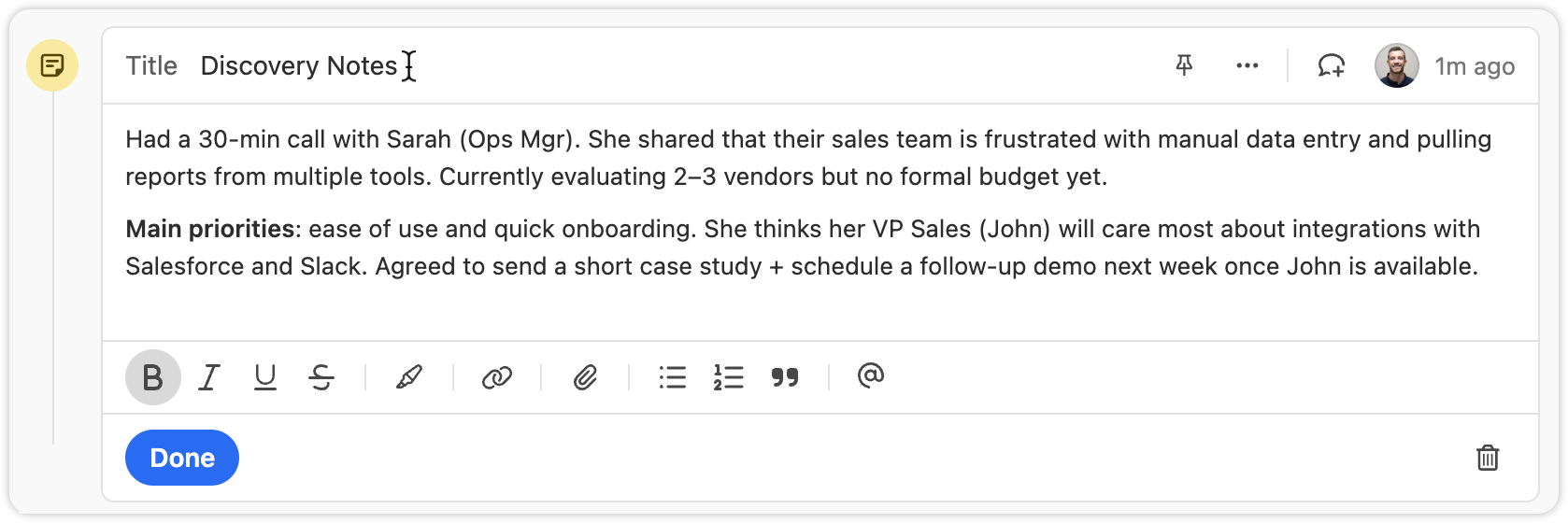
You can now set custom titles on Notes.
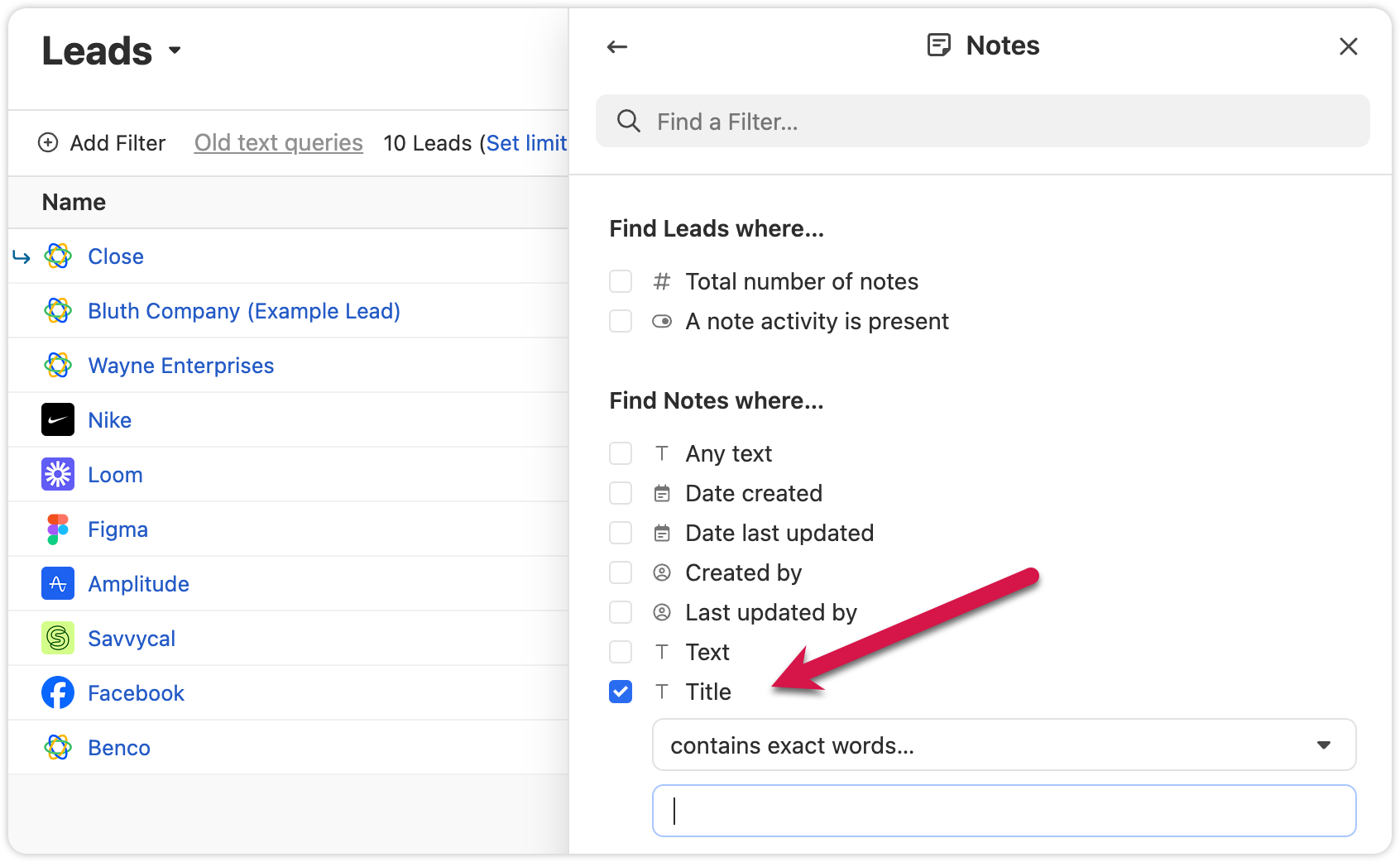
Titles are also searchable, making it easier to find key information in Smart Views
Export Lead Fields
We added the option to only export columns that are included in that specific Smart View. This will help you get only the data you need.
Outras melhorias
Extra confirmation is now required when deleting custom fields, helping prevent mistakes.
Voicemail notifications now show a preview of the transcript when collapsed.
We added the abillity to cancel inline edits on the Lead page by pressing "esc"
Correcções de erros
The “all users” option in User Select is now searchable.
The member count in the membership view updates correctly when switching between organizations.
Nova funcionalidade
Pinned Notes & Custom Activities
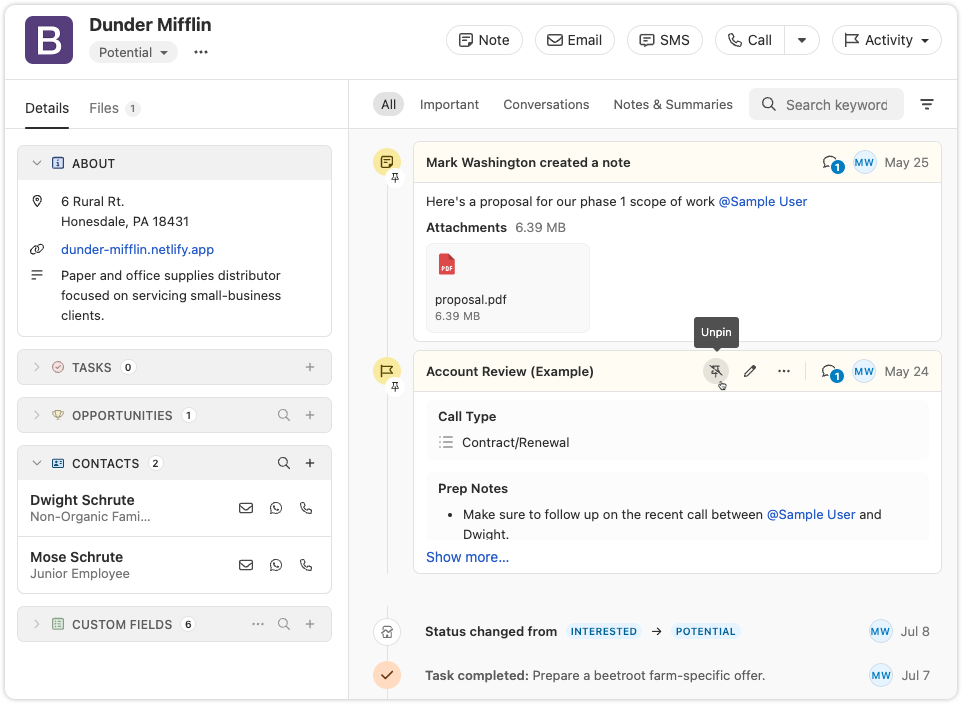
You can now pin Notes or Custom Activities on any Lead in Close. Pinned items appear at the top of the activity feed, making it easy for your team to highlight key info and updates.
Share a summary for your team: Pin a note that gives an overview of the lead’s status or next steps. Anyone who views the lead will see the summary first, helping reduce confusion or missed context.
Resurface important threads: If a note or custom activity contains details that might be needed later—like feedback, deal blockers, or helpful context—pin it so it’s always easy to find.
Esta funcionalidade já está disponível em todos os planos. Experimente-a e diga-nos o que achou!
Nova funcionalidade
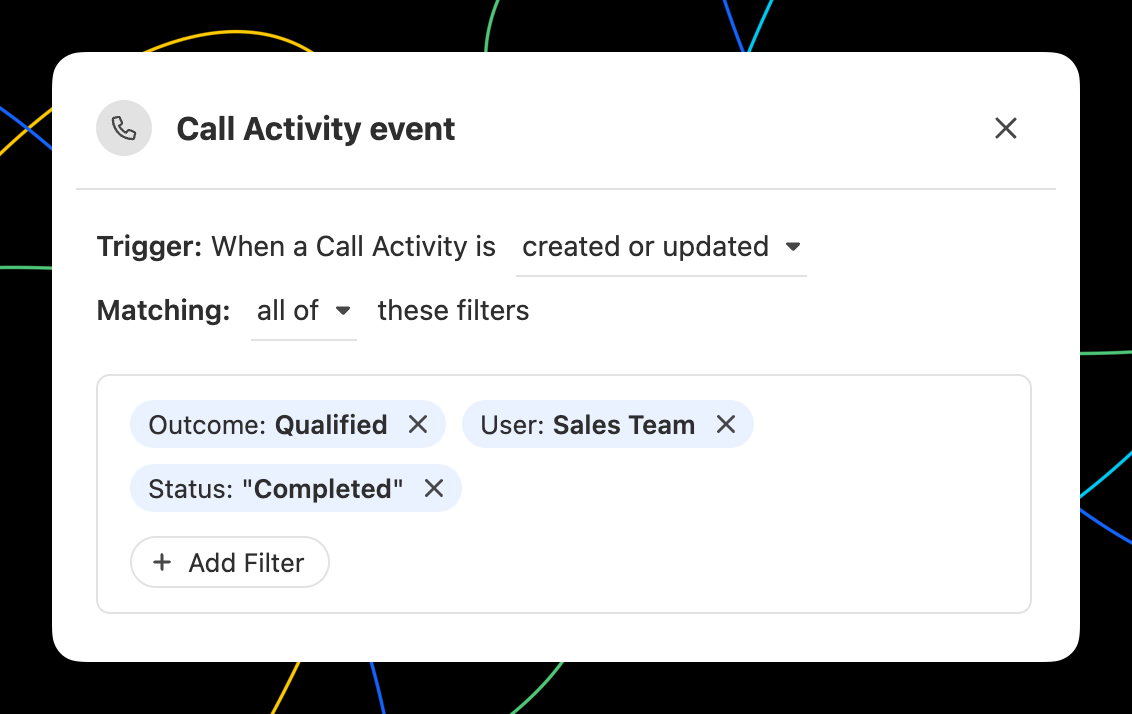
Trigger Workflows on any Call event
In Workflows, you can now trigger a Workflow when any Call event occurs. All of the filter options you'd expect are available, including Outcomes! With the Call event trigger, you can...
Automate email or SMS to the contact that was called.
Automatically assign the Lead to the user that made the call.
Create tasks to notify yourself or others when there is a Call that meets certain criteria.
Use a Call matching certain criteria to update Lead fields using the call context with AI Enrich.
Nova integração
Sincronização do WhatsApp através do TimelinesAI
A TimelinesAI lançou uma Close que sincroniza automaticamente as mensagens do WhatsApp com os seus potenciais clientes — utilizando o nosso novo tipo de atividade do WhatsApp.
Com esta integração, é possível:
Criar automaticamente novos leads quando receber uma mensagem no WhatsApp e não existir nenhum contacto correspondente
Registe as mensagens do WhatsApp como atividades nativas na Close — incluindo texto, localizações e anexos até 25 MB
Correlacione as mensagens com os potenciais clientes utilizando números de telefone no formato internacional
Atribuir a responsabilidade pelo lead com base em quem é o proprietário do chat do WhatsApp, da conta do WhatsApp ou, caso contrário, ao proprietário da integração
🎁 Close têm direito a um período de teste gratuito especial de 30 dias ao inscreverem-se através deste link. Utilize o código CLOSE15OFF para obter um desconto de 15% para sempre.
Nota: O tipo de atividade do WhatsApp também está disponível através da Close e do Zapier — ideal para ferramentas como o Superchat ou integrações personalizadas.
Nova funcionalidade
Automatically update Leads using Workflows
Automatically update Leads using the new "Update Lead" step in Workflows:
Automatically update any standard Lead or Lead Custom Field.
Map fields from the trigger data to Lead fields.
Use AI Enrich to automate lead enrichment or any other research task!
Nova funcionalidade
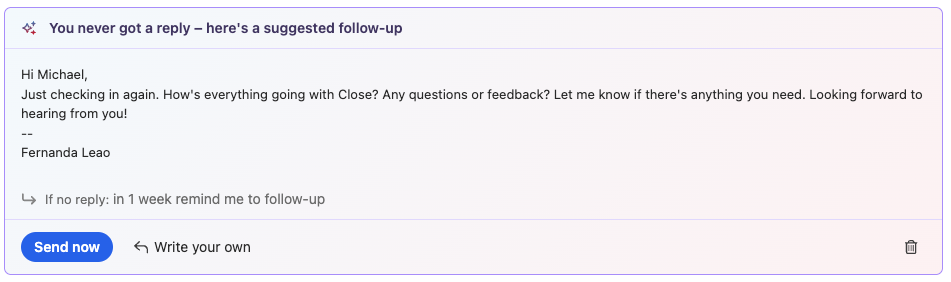
AI Suggestions on Email Reminders
Close will now suggest a follow-up message when an email reminder comes due, helping you take action faster.
Suggestions appear right in your inbox when the reminder is triggered
Send immediately or make quick edits inline
Open in the full editor if you need access to more tools
Melhorias
Melhorias em Julho
O que há de novo
Tomador de notas
You can now pause or resume Notetaker recording right from within the app. The meeting reminder bars now show more detailed statuses and recording controls. You can find more information about this feature here - Notetaker
Pause and resume directly from the meeting bar
Fluxos de trabalho
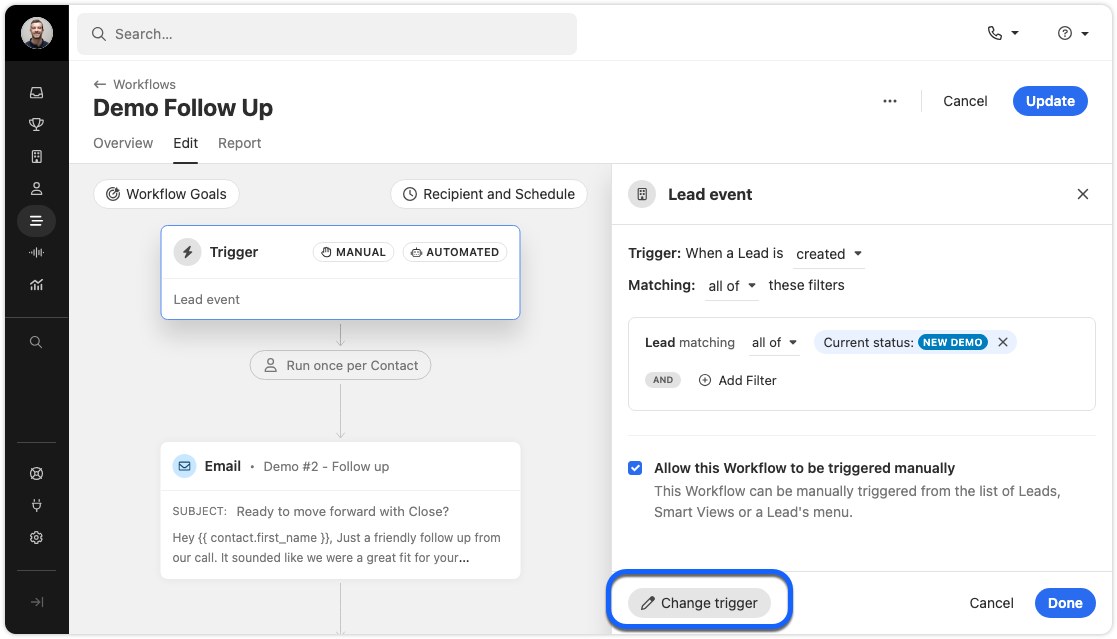
Workflow trigger editing just got easier. Instead of deleting an old trigger to add a new one, you can now “replace” the trigger. If you cancel while adding a new trigger, your old one will stay in place. This ensures your workflow is never left without a trigger.
Change trigger
Filter Improvements
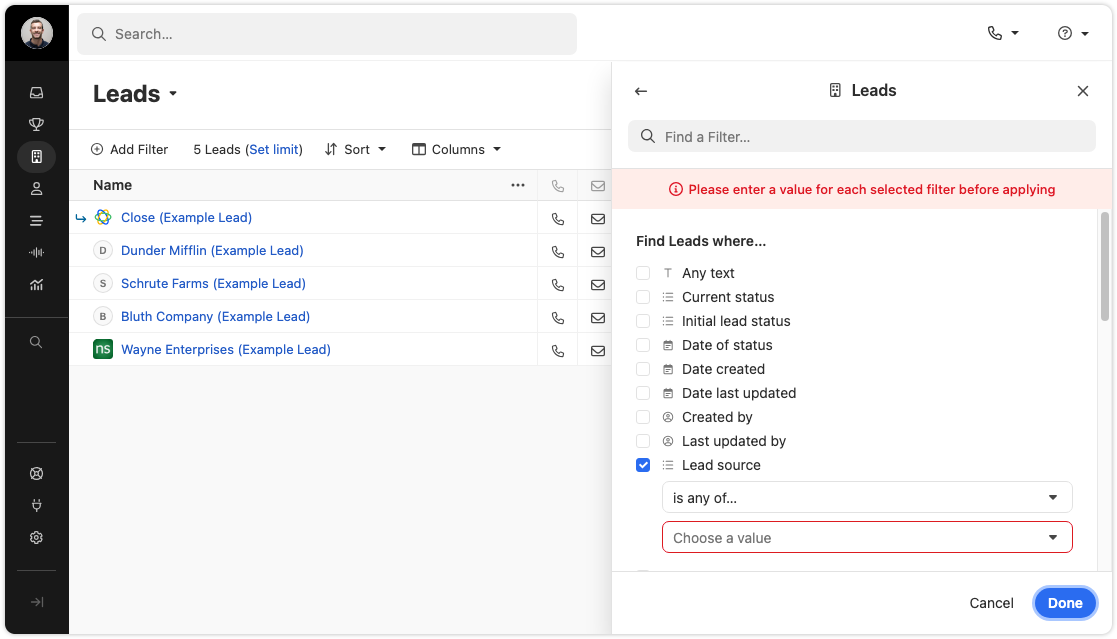
We’ve added a validation check to the filter editor fields for Leads, Contacts, and Workflow triggers. This makes it easier to build accurate filters and avoid mistakes.
Filter validations in action
Import Page
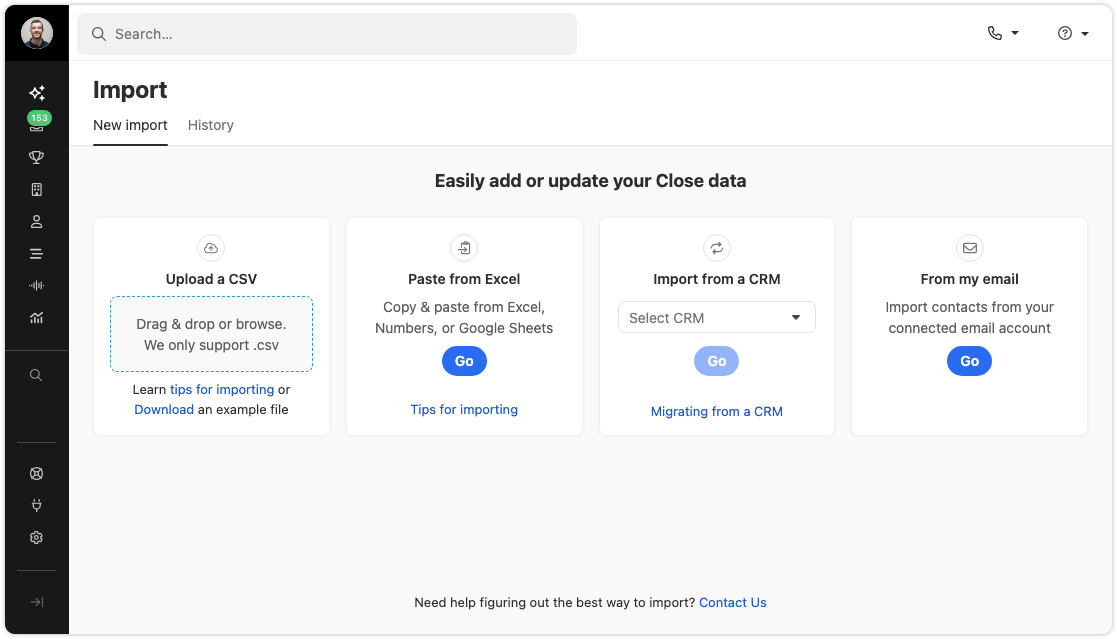
We’ve refreshed the import data page with updated designs and a new panel for importing Potential Leads & Contacts from your connected email. The functionality is largely unchanged, but it’s now easier to find the import options you need.
Import from CSV, migrate from CRM, or from email
Chamada
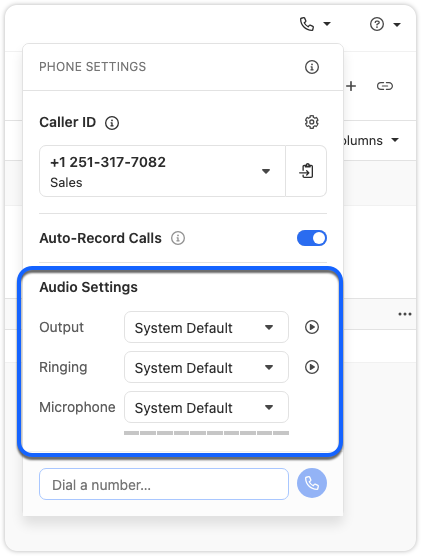
You can now switch devices during an active call. If you need to change your headset or microphone, just use the Phone Settings popover. There is no need to hang up or refresh.
Change your microphone or speaker during a call
Coach Invite and Call Transfer menus in the call bar are now grouped by user availability, and offline users no longer appear in the transfer list. The menus now look and work the same, giving you a faster, more consistent experience.
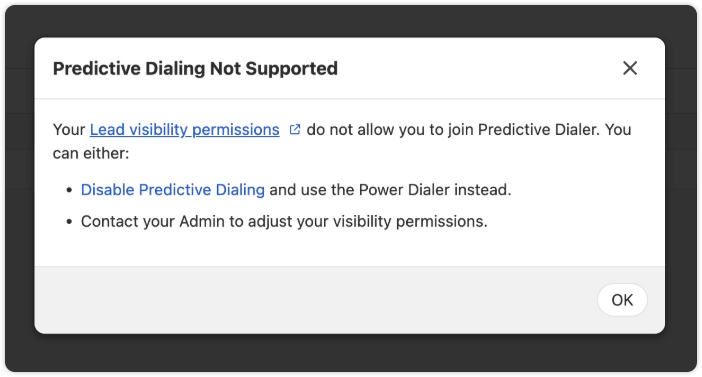
In some cases, the Predictive Dialer can’t be used on a specific Smart View. Instead of a generic “Predictive Dialer Not Supported” message, you’ll now see suggested solutions and a link to our help documentation with more details.
Other Improvements
SMS messages now use smart encoding. This helps reduce delivery failures and can lower outbound message costs. Smart encoding replaces certain Unicode characters with GSM-encoded characters, which helps avoid unnecessary encoding to UCS-2 and keeps your messages within carrier limits.
When creating or editing Custom Fields, the dropdown for field types now displays headings for each section.
Destructive action, such as Delete buttons, now have a more obvious red background to highlight their impact.
Reporting page headers now behave more consistently.
Correcções de erros
The “Unsaved Changes” modal will no longer appear for a workflow that has just been deleted.
Fixed an issue where the display name of a Contact would not appear during calls.
The 'Create a Workflow' button now works correctly when no workflows exist.
Checkbox alignment in some tables has been fixed.
Nova funcionalidade
New and improved Calendly integration
We have made several enhancements to Close's integration with Calendly:
Automatically create Contacts when new meetings are booked (including duplicate detection)
"Round Robin" Event Type support
Use the "Sync" button to force update recent changes to your Calendly account into Close
We're excited to announce a new feature that helps you track and categorize the results of your calls and meetings. With Call + Meeting Outcomes, you can:
Categorize conversation results - Create your own custom outcomes to track the results of your calls and meetings.
Set outcomes during or after conversations - Easily mark the outcome of calls and meetings to better understand conversation effectiveness.
Automate outcome tracking - When using voicemail drop, the designated outcome is automatically set.
Create custom outcomes - Add your own outcomes with descriptions to match your team's specific workflow and terminology.
Report on outcomes - Filter and report on activities with specific outcomes to measure your team's performance.
Add Contacts to Tasks: You can now add a Contact directly to a task! This makes it easier to track who you need to follow up with. This also gives you a way to quickly call or email the specific Contact by directly clicking on an action icon in the task from the Lead page or Inbox.
Add a Contact to a Task
WhatsApp Integration Links
WhatsApp Integration Links are now available for all organizations. When enabled, a WhatsApp link appears on SMS notifications in the inbox and on phone numbers in the Contact’s card in a lead. Clicking the link opens WhatsApp Web to a chat with that number, if one exists.
You can manage this under Settings > Integration Links > Contact. For more info, check out our WhatsApp Integration help doc
Enriquecimento por IA
Field Level Control: Admins can now turn off AI Enrich for any custom field. This is great for fields, like an internal ID field, that you never want enriched, intentionally or accidentally.
Enable or disable AI Enrich per field
Manual Run Permission: There’s now a separate permission for manually running AI Enrich on records. Before, you could only control who could run it in bulk. Now, you can set who can trigger enrichment manually. All AI Enrich permissions are grouped in a new section on the roles page for easier management.
Configure User Permissions
Tomador de notas
Improved Recording Timing: Notetaker only starts recording when a second participant joins your meeting. No more recordings full of silence or you talking to yourself.
All Participants Visible in Recordings: Recordings now display all meeting participants simultaneously, not just the current speaker. This helps capture body language and makes it easier to give feedback during training sessions.
Workflows by Owner: The Workflows list now shows the owner of each workflow. You can also filter by the owner to quickly find the Workflows important to you. This filter stays applied, so when you return to Workflows, you can pick up right where you left off.
Reassign Workflow Ownership: When a user is removed, the admin will be prompted to reassign any workflows owned by that user.
View and filter by Workflow Owners
Additional Improvements
New Contact Card in Emails: Clicking on an email address in the activity feed or inbox now shows a new contact card. From here, you can call, text, or email the contact.
Gmail Signature Sync: When you connect your Google account, your Gmail signature will sync automatically.
Email Open Tracking for Essentials Plan: If you’re on the Essentials plan, you can now track email opens in Close without having to upgrade your plan.
Mobile Table Improvements: The keyboard navigation icon is now hidden on Leads and Contacts tables when viewed on mobile, so you can see more info.
Correcções de erros
Fixed an issue that prevented users from exiting “Full screen” after entering fullscreen mode on the report page.
Nova funcionalidade
Orientação sobre o pipeline
Pipeline Guidance is your AI-powered deal assistant. It automatically highlights what needs your focus, suggests actions to move opportunities forward, and helps you take immediate action through one-click options. These options include drafting emails and SMS messages, moving opportunities to the correct status column, and launching the dialer to call leads right away.
Note: This feature is available on the following plans: Growth, Scale, Professional, Business, Enterprise. There is no additional AI charge at this time.
Pipeline Guidance helps you quickly work through your Opportunity Pipeline in two ways:
Flagging Opportunities that need attention
Providing AI-powered suggested actions to help move flagged opportunities forward toward closing or clean up your pipeline if the deal is clearly lost.
Focusing On Opportunities That Need Attention
There’s a new toggle at the top of the Opportunity Pipeline that says “Needs attention.” Enable this to show only deals that have been flagged as needing attention.
The following criteria cause an opportunity to be flagged as “Needs attention”:
The opportunity is past its estimated close date
The opportunity has been in its current pipeline status for longer than is typical for that status
The opportunity has had recent communication from the lead that has gone unanswered by your team
Suggested Actions
Opportunity cards that need attention use AI to suggest the appropriate next action based on recent activity associated with that lead, such as meetings, calls, and emails.
Suggested actions are our system’s best guess at what you should do next. You may not agree at times! If you do not wish to follow or no longer wish to see a given suggested action, you can click “Dismiss” to hide that suggestion for that opportunity.
Example situations and suggested actions:
If a rep has been emailing a lead with no response, the suggested action might be to try calling the lead instead. Clicking “Follow Up” in this case would dial the lead.
If the lead said they would check back in after a few days and hasn’t emailed back, the suggested action might be to email them. Clicking “Follow Up” in this case would open a draft of an email that’s already written and ready to send or tweak.
If an opportunity is clearly lost based on recent communication from a contact on the lead, clicking “Change Status” would quickly move the Opportunity to the Lost status.
You will also see suggested actions in other places where opportunities appear, such as Inbox Reminders and the Lead page.
Get Closing!
Pipeline Guidance streamlines your sales process by intelligently identifying opportunities that need attention and providing actionable, AI-powered suggestions. By automating the identification of at-risk deals and offering one-click solutions, this feature helps you stay focused on what matters most: closing deals and maintaining a clean, efficient pipeline.
Nova funcionalidade
Webhooks Dashboard
The Webhooks dashboard allows admins to view, pause, and reactivate all of the organization's webhook subscriptions. Use the search bar to search for webhooks by webhook ID and click on any event to view the filtered event JSON. Only Users with the "Manage Organization" permission are able to view this dashboard.
We are excited to launchAI Enrich,a new feature built directly into Close that helps you populate and update Lead and Contact records in seconds.
Use AI to populate fields on a Lead or Contact
Here’s what you get with AI Enrich
Enrich in seconds, not minutes: Instantly pull data for any field without leaving Close. No more switching tools or copy-pasting.
Go beyond outdated databases: Get real-time, context-rich information pulled directly from the web, not from stale third-party lists.
Tailor AI to your needs: Use an optional, simple prompt to guide the AI and get highly relevant answers for any custom field.
Power smarter workflows: Cleaner, more complete records lead to better automation, segmentation, and reporting.
No setup required: AI Enrich is fully native to Close. No integrations or extra tools needed.
What it Does and How it Works
AI Enrich allows you to request AI-generated values for fields on your Lead and Contact records. This feature uses the information from the record (like a Lead name or website) as context to search the web for the best data for the field you're enriching.
You can use AI Enrich for a single record or in bulk. When viewing an individual Lead or Contact, you'll see a new icon to automatically get data, and for broader updates, you can enrich fields for multiple records at once from a Smart View.
Watch this quick demo to learn more:
For more details, please see our help documentation: AI Enrich
Melhorias
Melhorias de Maio
O que há de novo
Melhorias no bloco de notas
Agora já pode copiar e colar as transcrições do Notetaker das suas reuniões!
Agora pode filtrar por reuniões e chamadas na página Conversas . Existem também dois novos filtros na pesquisa (Transcrição da gravação / Foi gravado) que estão associados à gravação/transcrição do Notetaker.
Será exibido um ícone de aviso quando for necessário prestar atenção para ativar o Notetaker em Definições , como sincronizar com o Zoom, o Calendário ou ativar o Notetaker.
Melhorias na integração com o Calendly
Quando ligar a sua conta do Calendly ao Close, os links de agendamento que vê no Close a corresponder ao que vê na visualização predefinida «O meu Calendly» no Calendly. Isto inclui quaisquer links «Partilhados consigo» ou Round Robin!
Outras pequenas melhorias
Ampliamos as nossas opções de integração com sistemas de CRM, aumentando o número de sistemas compatíveis de 28 para 50, graças à nossa parceria com a Import2!
Melhorámos o menu de adiamento das tarefas na página inicial, que agora se baseia no dia atual, em vez da data de vencimento da tarefa. Isto alinha-o com os menus de adiamento encontrados noutras partes da aplicação, como a caixa de entrada.
Os nomes longos de objetos personalizados passam agora a quebrar em linhas, em vez de serem truncados. Isto permite a leitura sem ser necessário passar o cursor sobre o nome do objeto personalizado.
Agora pode ver todos os campos de Objetos Personalizados/Atividades Personalizadas digitando os seus nomes na caixa de pesquisa da barra lateral do Filtro.
Passamos agora a apresentar as ações disponíveis ao passar o cursor sobre uma Oportunidade, de forma consistente com as outras visualizações do menu da barra lateral.
Correcções de erros
Corrigimos um problema que impedia que a transcrição da reunião fosse carregada de forma consistente.
Nova funcionalidade
Dark Mode
Whether you’re burning the midnight oil or just prefer a sleeker interface, you can now switch to Dark Mode on web and desktop. You can turn this on in "Settings" → "Appearance" or via ⌘ + K by searching for “dark”.
Nova funcionalidade
Close (Beta)
Acabámos de lançar a versão beta pública do Notetaker — o seu novo companheiro para conversas no Zoom, no Meet e no Teams. Basta ativar o Notetaker e ele irá juntar-se automaticamente a todas as reuniões agendadas no Close decorram no Zoom, no Meet ou no Teams.
Após cada reunião, a gravação, o resumo e a transcrição aparecerão diretamente no Close.
Gravações, resumos e transcrições de todas as suas reuniões, diretamente no Close.
Basta ligar o seu calendário e o Zoom (opcional) e permitir que o Notetaker participe nas suas reuniões.
Nota: O Notetaker é totalmente gratuito durante este período inicial de beta, mas passará a ser um complemento pago numa data posterior.
Nova funcionalidade
Improved Filtering for Custom Objects & Custom Activities
Previously, the search inside of the filter menu would not reveal Custom Objects or Custom Activities that matched your search string. This has been improved so that you can now search for Custom Objects and Activities and you will see all of the properties of that object.
Melhorias
Melhorias em Abril
O que há de novo
Fluxos de trabalho mais inteligentes
Acionar apenas quando houver informações de contacto: os fluxos de trabalho incluem agora novos filtros para «números de telefone» e «e-mails». Estes ajudam-no a evitar que as automatizações sejam acionadas em Leads ou Contactos sem detalhes de contacto (finalmente!). Defina pelo menos 1 filtro para garantir que só envia mensagens a potenciais clientes reais.
Visualizações guardadas, reuniões e muito mais
Adicionar descrição às visualizações guardadas: Agora já pode adicionar uma descrição a qualquer visualização guardada — incluindo visualizações inteligentes, relatórios e conversas. Use esta funcionalidade para partilhar contexto com os colegas de equipa ou para se lembrar da finalidade da visualização.
Horários das reuniões, não apenas a duração: as atividades das reuniões na linha do tempo mostram agora horários de início e fim claros, em vez de apenas a duração. É mais fácil de consultar, especialmente quando se tem de gerir uma agenda cheia.
A introdução de datas nos leads ficou mais inteligente: ao editar campos de data na página de leads, agora pode escrever abreviaturas como «18/4» e nós tratamos da formatação.
Caixa de entrada e tarefas
Cabeçalho da caixa de entrada (dispositivos móveis): O cabeçalho da caixa de entrada passa agora a esconder-se à medida que se desliza para baixo e reaparece quando se desliza para cima. Isto proporciona-lhe mais espaço para se concentrar nas suas mensagens.
Adiar: Quando adiares uma tarefa, passarás a ver uma notificação de confirmação — para saberes que a ação foi bem-sucedida. Já não é possível adiar uma tarefa para a data de hoje, uma vez que isso não a retiraria da tua caixa de entrada.
Correcções de erros
Corrigiu-se um erro que fazia com que os botões de ação no separador «Ficheiro» de um potencial cliente ficassem desalinhados.
As chamadas transferidas para o correio de voz através do Power Dialer eram incorretamente marcadas como «atendidas» em vez de «mensagem de voz deixada». Agora, essas chamadas apresentarão o estado correto, proporcionando-lhe relatórios mais precisos e permitindo ações de acompanhamento mais eficazes.
Nova funcionalidade
Custom Activity, Opportunity, and Contact Workflow Triggers
Trigger Workflows based on Lead, Contact, Opportunity, or Custom Activity events
You can now automatically trigger a Workflow based on Custom Activity, Opportunity, and Contact events. With these new powerful triggers, here are just a few examples of what you can automate:
When an Opportunity has been marked Won, update the Lead Status to "Customer".
When a "Customer Interview" Custom Activity has been published and the "Send Gift" field contains "Yes", send an email to the contact who participated in the interview asking for their address and create a Task for the account manager to send the gift.
When a Contact unsubscribes from email, update the Lead Status to "Opt Out".
In addition to the new Triggers, we've expanded the options of which Contacts you can enroll in the Workflow based on the Trigger type you selected. This includes the Contact associated with the Opportunity for Opportunity events, any Contact
Watch this quick demo to learn more:
Melhorias
Melhorias de Março
O que há de novo
Smarter filtering across Leads and Conversations
New Zoom recording filter: A new filter is available on the Leads page that will let you return Leads that have meetings with Zoom recordings.
Improved Conversations filter: On the conversations page, when you filter for the “Recorded calls only” it will also now also include calls with Zoom meetings. giving you a more complete view of recorded interactions.
Timestamp support for date filters: Date-based filters (like Lead creation date, Contact update time, etc.) now support hours and minutes, not just full days. This allows for more granular reporting and filtering—especially useful for automation triggers.
Calling & Transcripts
Speaker Visualizations: For calls with transcripts, speaker visualizations now appear directly in the scrub bar, making it easier to scan and navigate between speakers—eliminating guesswork about who said what.
Improved call outcome labels: We’ve made a small but important change to how we label call activity in the timeline. Previously, if a call was either unanswered, busy, or rejected, we always showed: “Attempted to call [Number]” We know a call being actively declined or blocked is different from it going unanswered. Now, if the call was busy or rejected, we’ll show a clearer message: “Call to [Number] was busy or rejected”. We hope this distinction helps your team better understand call outcomes and what to do next—whether it's retrying later or following up another way.
Zapier Improvements
Lead field is now optional: In the “New Contact” and “New Opportunity” Zap actions, the Lead field is no longer required—giving you more flexibility when creating new records.
Export transcript utterances: The “New Call Transcript” trigger now lets you export individual lines of a call transcript, so you can feed more detailed data into your workflows.
Correcções de erros
Fixed an issue where you needed to refresh the page to make a call after adding an external number.
Fixed a bug where the dialer didn’t load properly in user-specific Smart Views.
Resolved a layout issue in the Lead File tab where action buttons could become misaligned.
Improved spacing when multiple avatars appear on an activity item.



.png)



.png)


.png)

.png)

.png)


