Nueva función
Workflows: Minute delays, drafts, and more actions


Si es un equipo tecnológico que necesita escalar sin pagar de más por un software de ventas empresarial, ha encontrado la herramienta de ventas adecuada.
Desde la página de inicio y la bandeja de entrada, ahora puedes seleccionar conversaciones de SMS para que te acompañen por toda la aplicación, fijadas en la parte inferior de la pantalla. Cuando lleguen mensajes nuevos, los verás al instante y también se reproducirá el sonido de notificación.


.png)


You can now access the Potential Contacts page directly from the Inbox and New Lead modal. This makes it faster to uncover and connect missing contacts without leaving your current workflow. You can read more about this feature in our help docs here.


Too many Smart Views in your sidebar? You're not alone. We've made some big updates that should help you get all your clutter under control.
New Saved Views Page
Haz clic en el nuevo icono situado junto al cuadro de búsqueda de la barra lateral para ver la nueva página «Vistas guardadas». En esta página se muestran todas las vistas inteligentes, conversaciones e informes a los que tu usuario tiene acceso dentro de tu organización.

With robust filtering, this new page makes it easy to find what you're looking for. Filter by type, sharing, or creator. You can also sort the list by when a Saved View was created or last used. Try sorting to see the oldest views at the top and using our new bulk delete feature to remove old, unused Smart Views, Conversations, and Reports.

Pinning Improvements
We've also made it super easy to clean up your sidebar with a new "Unpin" icon that appears on hover. Items that you remove from your sidebar will still appear in the new Saved Views page, so you never have to worry about losing them! You can use your sidebar for the most important Smart Views that you access regularly and keep everything else on the new page.

If you need to get any Smart View back that you've unpinned, simply click the three dots on any Smart View on the new page and click "Pin to Sidebar" to bring it back. Easy peezy!


Ahora puedes añadir destinatarios en CC y CCO a cualquier plantilla de correo electrónico. Estas direcciones de correo electrónico se incluirán automáticamente cada vez que se utilice la plantilla en Close.

Además, ahora puedes ordenar la lista de plantillas de correo electrónico por cualquier columna, incluida la de «Última actividad». Asimismo, puedes seleccionar varias plantillas a la vez para desarchivarlas, archivarlas o eliminarlas. Dado que los equipos suelen crear nuevas plantillas mientras que las antiguas quedan obsoletas, hemos simplificado la organización y limpieza de tu lista de plantillas. Esto te ayuda a ti y a tu equipo a encontrar rápidamente las plantillas que más os interesan.
There are two new options for Workflow conversion goals - Meeting booked and Lead status change.


You can now add attachments to SMS templates. Attachments can only be sent to US, CA, and AU numbers. Go ahead and include an image of that new feature you just launched!

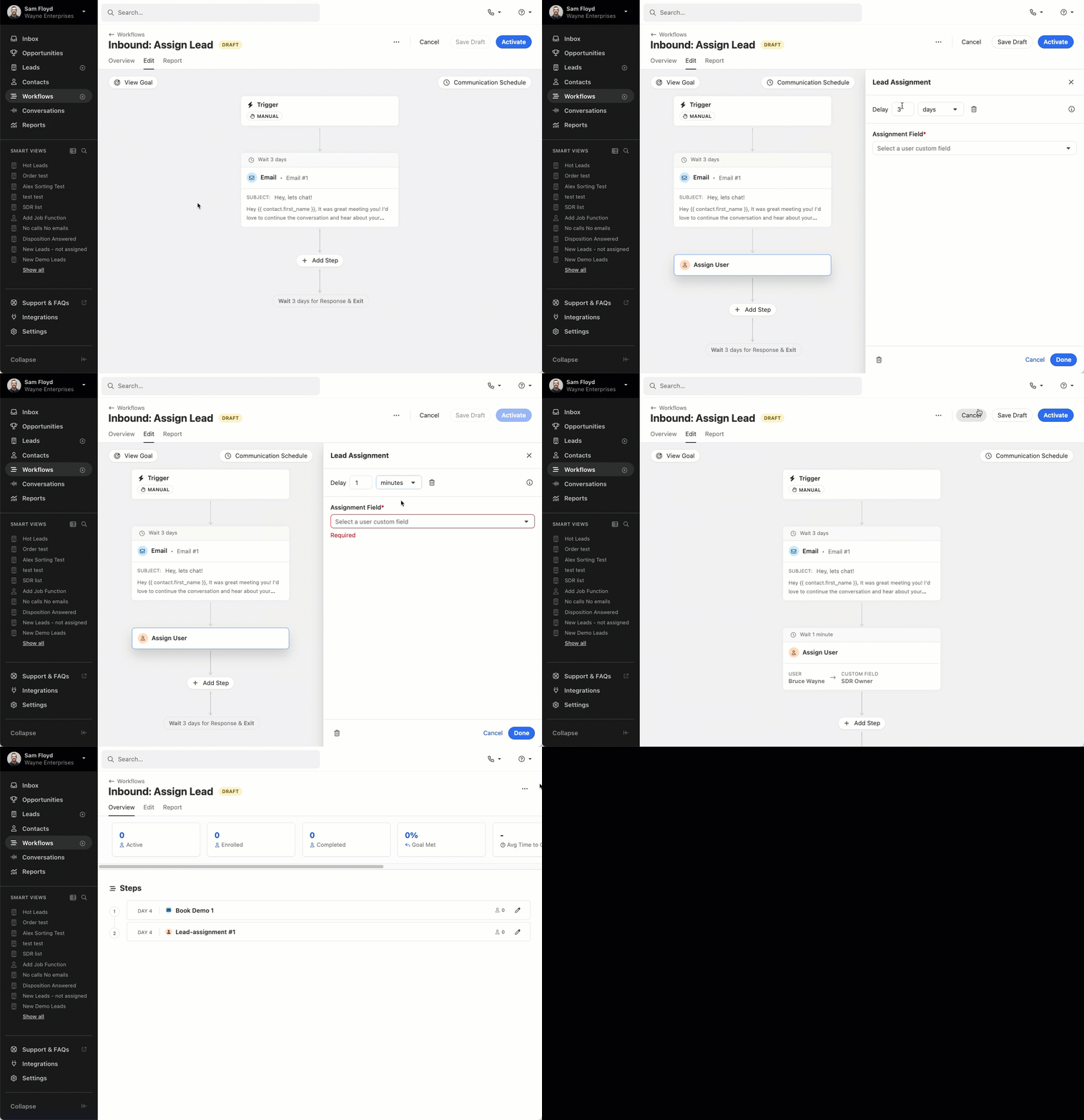
Before, you had to keep closing and opening the sidebar to edit workflow steps, which made the screen jump around and was hard to work with. Now, you can see and edit everything at once. We've also made the layout more stable so things don't move around as much when you make changes.
In the Workflow list, we added the option to sort by any column, added a new “last activity” column, and made a few visual design updates to polish things off. Finally, we also added the option to select multiple workflows at once. All these changes were made to help you find your most important, active workflows quickly and ensure your team’s Workflow list can easily be cleaned up.

You can now instantly share Smart Views with entire groups within your organization. Previously, sharing a Smart View required selecting individual users one by one. With this update, users can select a group, and all current and future members of that group will automatically have access to the Smart View.
This feature is available to Enterprise customers who have at least one group in their account. It simplifies the sharing process and ensures that as group memberships change, all members will always have the appropriate access to Smart Views.
To share an existing Smart View with a group, click the edit icon. If your organization has any groups, you'll see a "Groups" tab where you can select groups to share the view with:

To create groups, go to Settings and select the "Team Management" tab. Note that your plan must have access to groups in order for you to see this feature.


We made two exciting updates designed to make importing and managing your data in Close more seamless than ever. These enhancements give you more functionality, save you time, and simplify your workflows.
Importing Opportunities
You can now create or update opportunities using the importer, making it easier than ever to manage your sales pipeline.
Importing opportunities follows the same familiar flow as importing leads or contacts. Simply map the necessary fields during the import process, and Close takes care of the rest.

Error Handling
We’ve made it simpler to address import errors. The importer’s pre-validation now checks for issues across all field types, including text, number, and date fields.
During the field assignment step, Close automatically identifies errors and provides the option to fix them directly within the review modal. There’s no need to edit your spreadsheet or start over. Simply make corrections on the spot and continue with the import.


.png)

We've made a number of improvements to our Inbox experience to help you drive your inbox count to zero and focus on high value items first.
Customizable Primary Tab
You can now control which items show up your primary tab and your Inbox count. This allows you to focus less on lower value Inbox items (e.g. follow-up reminders, OOO messages, etc.) and more on human-sent messages if you prefer.
To customize your Primary tab, simply locate the setting icon near the top of the Inbox page. Any items that you deselect will still be available in their dedicated Inbox tabs.

Reminders Tab
We've added a tab dedicated to reminders that will show you any follow-up reminders (both email and opportunities) separate from emails and other items.

Send + Done and Reply Detection
We will now automatically mark emails as Done when you send a reply by default. Previously, each send required a redundant click to remove the item from your Inbox. If you're in a scenario where you'd prefer to send a reply but keep the item in your Inbox, you can!

We've also made it easier to keep your Inbox clean when you email inside and outside Close. Whenever we detect a reply to an item currently in your Inbox, we'll mark it as Done so that you don't have to clear out items you've already handled when working through your Inbox while in Close. These items are still available in your Done folder if you need to reference them.
Item Deduplication
We've improved the experience when receiving an email or SMS message from an email address or phone number that happens to be associated with multiple leads in your organization. Rather than that item being duplicated for each lead, you'll see a single item related to that message in your Inbox. You can easily view the other associated leads if desired, and marking the item as Done on one lead will mark the item as Done on any leads where that item was referenced. By default, the oldest contact that contains the email address or phone number will be the lead/contact that is shown in the deduplicated item.

SMS Conversation View
When receiving SMS replies and new messages in your Inbox, we'll now show you the full communication history between you and the contact (messages sent between the two numbers). This will give you full context into the conversation and make it easier to reply directly without leaving the Inbox.

You can now use natural language to search and filter your Leads and Contacts in Close. Our AI-fueled Search allows you to find leads faster by taking your prompts and automatically building filtered lists for you.

Novedades


Corrección de errores

Novedades


Customers on Pro, Enterprise, and Business plans can now use AI to generate concise summaries of Leads in Close.
These summaries include key details from recent activities, Custom Fields, Opportunities, Tasks, and Contacts. Whether you’re about to hop on a call, send an email, or prepare for a meeting, you’ll have all the essential information at your fingertips.

Lead Summaries are generated using advanced AI, but they may occasionally contain inaccuracies. You can help improve the quality of summaries by using the Thumbs Up and Thumbs Down button.
For more details on this feature, please refer to our help documentation.

Aprenda el cómo + por qué de Close en unos minutos.

Conozca Close con una visita guiada sin marearte.